
A slow WordPress website can frustrate visitors, reduce conversions and hurt your search rankings. If you use the Block Editor (Gutenberg), the good news is that you can build fast, high-performing websites without sacrificing design or functionality. You just need the right approach.
In this guide, you will learn practical ways to speed up your WordPress website, from choosing a reliable hosting provider and optimizing Gutenberg blocks to reducing unnecessary scripts, compressing images and improving overall performance. Whether you run a blog, business website or online store, these tips will help you create a faster experience for every visitor.
TL;DR
- Lightweight by design: Gutenberg generates clean code that typically loads faster than traditional page builders.
- Block themes improve speed: Block themes and Full Site Editing use fewer resources and reduce reliance on extra plugins.
- Most slowdowns are avoidable: Heavy block libraries, unoptimized images, complex layouts and poor hosting often cause performance issues.
- Core Web Vitals matter: A fast Gutenberg website helps improve user experience and supports better search rankings.
What Actually Determines WordPress Page Speed?
Before pinning speed problems on Gutenberg alone, it helps to see the full list of variables that decide how fast a WordPress page loads. The editor is only one piece of the puzzle.
Gutenberg’s role in this list is real, but it is not the whole story. A well-optimized block editor site on cheap hosting with a bloated theme will still load slowly and a modest page builder site on excellent hosting with a light theme can outperform a poorly built Gutenberg page. Keep that context in mind as we go deeper into the editor-specific factors below.
Page speed on any WordPress site comes down to a handful of factors working together:
- Hosting And Server Response Time: A slow server adds delay before the browser even starts rendering anything.
- Theme Code Quality: A theme that loads unnecessary scripts, fonts and stylesheets on every page will drag down performance regardless of which editor built the content.
- Plugin Load: Every active plugin can add its own CSS, JavaScript and database queries.
- Image Weight: Unoptimized, uncompressed images are still the single biggest cause of slow Largest Contentful Paint scores.
- Caching And CDN Setup: Pages served from cache and a content delivery network load dramatically faster than pages generated fresh on every visit.
- The Content Editor Itself: This is where Gutenberg, the Classic Editor and page builders each leave a different footprint in the final page.
How to Maximize Gutenberg Site Speed
A fast Gutenberg website is the result of consistent optimization rather than a single performance tweak. While Gutenberg already generates cleaner code than many visual page builders, your site’s speed still depends on how efficiently you manage blocks, media, themes and plugins.
Follow these proven best practices to keep your block editor website fast, responsive and optimized for Core Web Vitals:
Choose One Lightweight Block Plugin Instead of Multiple Block Libraries
Installing multiple Gutenberg block plugins often leads to duplicate features, unnecessary CSS and JavaScript files and increased page weight. For example, using two or three block collections for buttons, testimonials or pricing tables can load multiple asset files even if you only use a few blocks.
Instead, choose one well-maintained, modular block library that provides everything you need, eg. Essential Blocks. A single block plugin keeps your website easier to maintain and reduces the amount of frontend code visitors need to download.
Disable Unused Gutenberg Blocks
Most modern Gutenberg block plugins allow you to disable blocks you never use. This prevents WordPress from loading assets for those blocks across your website.
For example, if you never use Instagram Feed, Countdown Timer or Advanced Tabs, disable them from the plugin settings. Fewer active blocks generally mean fewer CSS and JavaScript files, resulting in faster page rendering and lower maintenance overhead.
Optimize Images Before Adding Them to Gutenberg
Images remain one of the biggest contributors to slow-loading websites. Before uploading media to the WordPress Media Library:
- Compress images without noticeable quality loss.
- Use modern formats like WebP or AVIF whenever possible.
- Upload images at their intended display size instead of oversized originals.
- Enable lazy loading for images below the fold.
Optimized images reduce download size, improve Largest Contentful Paint (LCP) and lower bandwidth usage, especially on mobile networks.
Remove Unnecessary Block Styles
WordPress loads several default block styles that may not always be required, especially if your theme or block plugin already provides custom styling.
Many performance plugins let you disable unused Gutenberg assets or conditionally load block CSS only where needed without writing custom code. Reducing unused CSS helps browsers render pages faster and improves overall page efficiency.
Use a Modern Block Theme
Block themes are built around the Full Site Editing architecture and generally rely on fewer frontend dependencies than classic themes combined with separate page builders.
Many modern block themes also use global styles and shared design settings, which reduce duplicated CSS across pages. If you are building a new website or planning a redesign, moving to a well-optimized block theme can simplify your site’s architecture while improving performance.
Set Explicit Image Dimensions
Always specify the width and height for images, videos and embedded content. Doing so allows browsers to reserve the correct layout space before media loads.
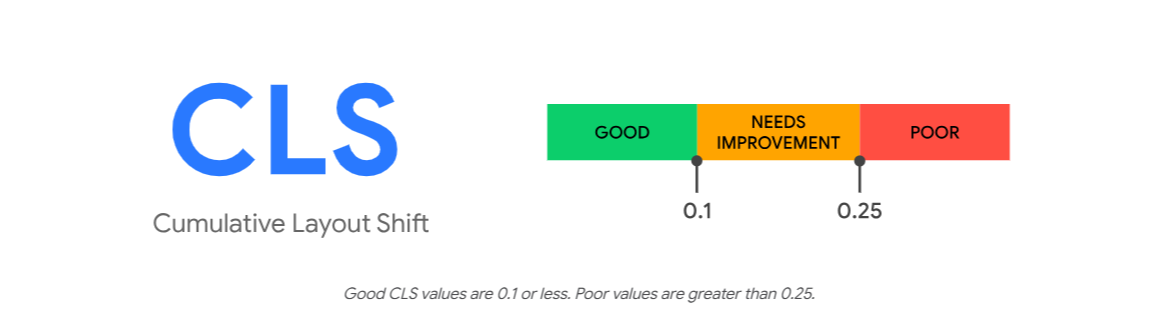
This simple practice helps reduce unexpected page movement and improves Cumulative Layout Shift (CLS), one of Google’s Core Web Vitals metrics. WordPress automatically adds image dimensions for Media Library images in most cases but custom embeds and manually added HTML should also include them.
Use Caching And a Content Delivery Network (CDN)
Caching reduces server processing by serving pre-generated versions of your pages instead of rebuilding them for every visitor. A Content Delivery Network (CDN) stores static assets on servers around the world, allowing visitors to download files from the nearest location.
Together, caching and a CDN can significantly reduce page load times, improve Time to First Byte (TTFB) and deliver a faster experience regardless of whether your website uses Gutenberg, Elementor or another editor.
Regularly Audit Your Plugins
Over time, WordPress websites often accumulate plugins that are no longer necessary. Some may duplicate features already available in your theme or primary block plugin, while others continue loading scripts even when unused.
Review your installed plugins every few months and remove those that:
- Duplicate existing functionality.
- Are inactive or abandoned.
- Load unnecessary frontend assets.
- Have not been updated for a long time.
A leaner plugin stack reduces maintenance, improves compatibility and often results in better performance.
Test Performance on Real Mobile Devices
Desktop scores only tell part of the story. Since Google primarily evaluates the mobile version of your website, testing on real smartphones provides a much more accurate picture of user experience.
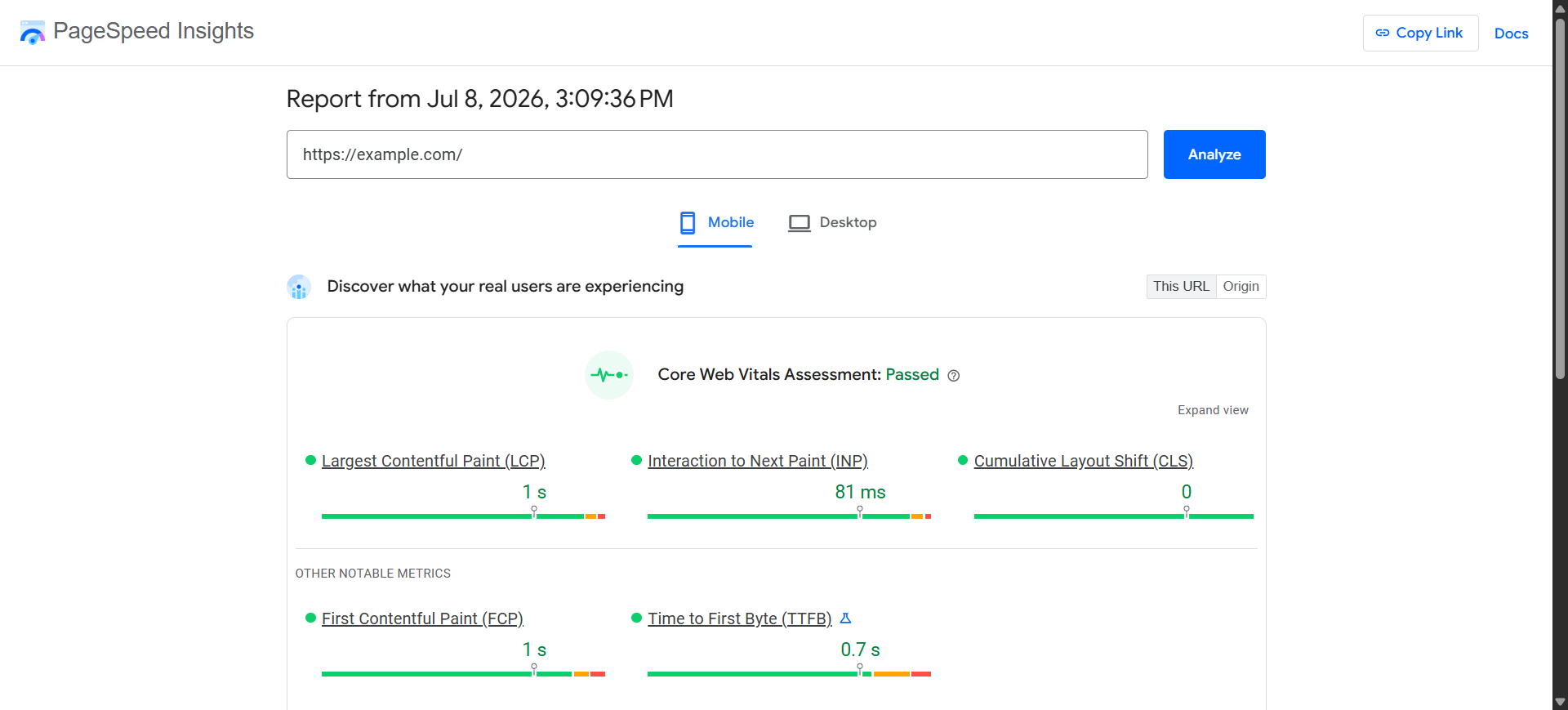
Source: PageSpeed Insight (https://pagespeed.web.dev/)
Use tools such as PageSpeed Insights, Lighthouse and Chrome DevTools alongside testing on actual mobile devices. Pay close attention to Core Web Vitals metrics such as Largest Contentful Paint (LCP), Interaction to Next Paint (INP) and Cumulative Layout Shift (CLS). Optimizing for real mobile performance often delivers the greatest improvements in both user satisfaction and search visibility.
Why Gutenberg Sites Often Load Faster
Gutenberg was designed around a simple idea: each block should load only the code and styling it needs, and nothing more. That design choice has real consequences for how quickly your pages appear.
Cleaner, Simpler Code
Gutenberg’s core blocks create clean, straightforward code, without the extra layers of wrapper elements that many page builders pile on by default. Less code means the browser has less to download and process, so the page appears faster and stays more stable while it loads.
Independent comparisons back this up. When one developer rebuilt the same page in Elementor and then in Gutenberg, the Elementor version contained 356 wrapper elements against just 77 for Gutenberg, and weighed 99 KB versus 28 KB for a page that looked essentially identical, as reported by WP Tavern.

Styling And Scripts Load Only Where They Are Needed
A core Gutenberg block only loads its styling and scripts on the pages where that block actually appears. A gallery on your homepage does not force every other page on your site to carry gallery styling it never uses.
This selective loading is one reason WordPress engineering teams such as rtCamp describe Gutenberg as producing cleaner, lighter pages that render faster and earn stronger Core Web Vitals scores.
Fewer Moving Parts Behind the Scenes
Many page builders load their own design engine, custom fonts and extra background scripts on every single page, whether or not a page uses any of those features. Gutenberg’s core blocks were built to avoid that pattern. Reviewers testing lean setups have reported hitting a perfect 100 performance score in Google PageSpeed Insights using a fast theme, the Gutenberg editor and a lightweight blocks plugin, with no special configuration.
Block Themes Tighten the Gap Even Further
Full Site Editing themes extend Gutenberg’s lightweight approach to the whole site, not just post content. Block themes are built in a lighter, more modern way than older themes, and they load styling only for the blocks that actually appear on a given page, instead of loading styling for every possible block across the whole site. That removes a layer of overhead older themes carry by default.
When Gutenberg Sites Do Not Load Faster
None of the architecture advantages above matter if a site owner undoes them with heavy plugins, sloppy images or an incompatible theme.
Here are the situations where a Gutenberg site ends up slower than expected and what actually causes each one.
Stacking Multiple Heavy Block-Library Plugins
Installing two or three different block-collection plugins at once, each with its own overlapping blocks, loads duplicate styling and scripts across your site. Each plugin brings its own files and WordPress will not automatically merge the overlap between them.
Unoptimized Images Inside Blocks
The image block, gallery block and cover block are only as fast as the media you feed them. A hero image uploaded straight from a phone camera at several megabytes will tank your LCP score no matter how clean the surrounding HTML is.
Excessive Nesting of Groups, Columns And Containers
Gutenberg makes it easy to wrap a group inside a group inside a column inside another group. Each extra wrapper adds another layer for the browser to work through, and a deeply nested page can slow down both how fast it loads and how responsive the editor feels while you type. WordPress’s own documentation notes that performance suffers as the number of elements on a page grows, especially on long posts, which is exactly what heavy nesting creates.
Loading Styling for Blocks You Never Use
By default, Gutenberg loads styling to support every core block, including ones your theme may never use. On a theme not built with block support in mind, that can mean carrying styling for blocks that never appear anywhere on the site.
Running Gutenberg on a Theme Built for Page Builders
Some older themes were designed around heavy scripts and frameworks from the page-builder era. Dropping Gutenberg content into that kind of theme means you inherit all of the theme’s baggage on top of the block editor’s own files.
Weak Hosting And No Caching Layer
Even the leanest block-based page will load slowly if the server takes over a second just to respond to the initial request. Caching and CDN configuration affect every editor equally but their absence is often mistaken for a Gutenberg-specific problem when it is really a hosting problem.
A reliable hosting provider can solve this issue. Try xCloud to improve your website’s performance with fast, powerful hosting that helps your site load quicker and run more efficiently.
Common Gutenberg Speed Killers And How to Fix Them
Common Gutenberg speed issues can slow down your website, hurt user experience and affect SEO. The good news is that most of these problems are easy to identify and fix.
The most common Gutenberg speed killers and the best ways to solve them:
| Problem | Root Cause | Fix |
| Slow LCP on image-heavy pages | Uncompressed, non-lazy-loaded images inside blocks | Compress images before upload, use WebP, enable native lazy loading |
| Unused CSS flagged in PageSpeed Insights | Block-library CSS loading site-wide by default | Switch off the extra block styling on pages that do not need it (a performance plugin can do this) |
| Bloated page weight with few visible blocks | Multiple overlapping block-collection plugins active | Standardize on one modular block plugin and disable unused block categories |
| Sluggish typing in the editor itself | Deeply nested groups and columns on long pages | Flatten nesting where possible and split very long pages into shorter templates |
| High server response time | Weak hosting or missing cache layer | Move to WordPress-optimized hosting and enable a caching plugin plus CDN |
| Page jumps around while loading | Missing width and height attributes on images and embeds | Set explicit dimensions on every image and embed block |
Core Web Vitals in 2026: Why Gutenberg’s Lightweight Design Matters More Now
Google’s Core Web Vitals, the loading, responsiveness and stability scores it uses as a ranking signal, remain a strict bar in 2026, which makes Gutenberg’s lightweight-by-default design more valuable than ever.
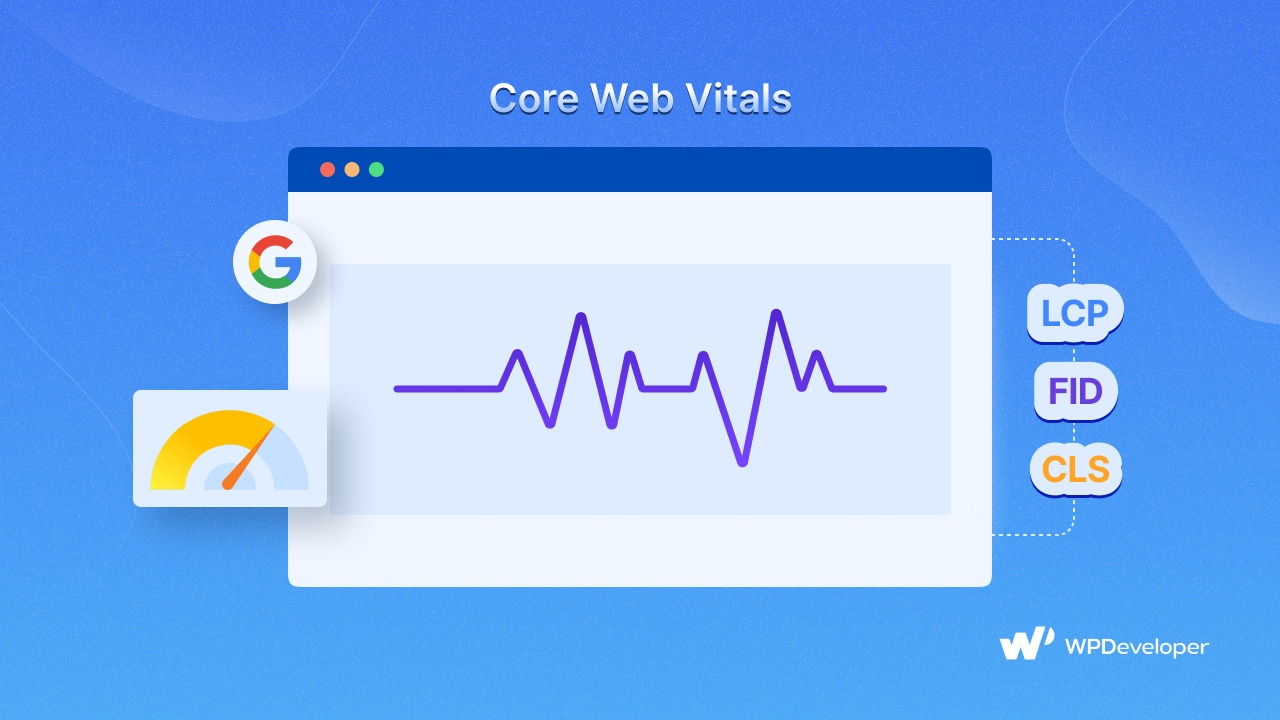
According to Google’s official Search Central documentation, a ‘good’ Largest Contentful Paint (how quickly your main content appears) is 2.5 seconds or less, a good Interaction to Next Paint (how quickly the page responds to a tap or click) is under 200 milliseconds, and a good Cumulative Layout Shift (how much the page jumps around while loading) is under 0.1. A page has to clear all three, on real visits, to count as passing.
There has been plenty of discussion across the SEO community during 2026 about Google tightening these targets further after its March 2026 core update, with some sites reporting ranking movement tied to slow loading. Whatever the exact numbers turn out to be, the direction of travel is clear: the tolerance for a slow homepage keeps shrinking, and a lightweight starting point is a genuine advantage.
A Practical Example: Rebuilding a Slow Landing Page in Gutenberg
Consider a common scenario. A marketing team has a landing page built years ago in a page builder. With every redesign, it has grown heavier, with new sections bolted on with nested widgets, sliders and shortcodes until the page takes several seconds to appear on a phone. The design still works, but the speed score is quietly hurting rankings and conversions.
What happens when a team rebuilds a page like that with Gutenberg core blocks and a lightweight blocks plugin? Two well-documented, real-world tests show the pattern clearly.
The first is developer Kyle Van Deusen’s Elementor-vs-Gutenberg rebuild. He took a simple four-section landing page, a hero, a featured row, a quote/statistic and a call to action and recreated it in Gutenberg. In GTmetrix, the two versions were close, but Google PageSpeed Insights told a different story: the Elementor version scored just 46 on mobile, while the block editor rebuild pulled comfortably ahead. Same design, dramatically better score.
The second is a markup comparison covered by WP Tavern, in which developer Munir Kamal rebuilt a page-builder homepage in Gutenberg. The page builder version carried 356 wrapper elements and about 99 KB of code; the Gutenberg version needed only 77 wrappers and roughly 28 KB, nearly a 70% reduction in raw page weight for the same layout. Another team quoted in that same coverage watched their PageSpeed score climb from 83 to 98 after switching a page to Gutenberg.
If you want to run the same play on your own slow page, the steps look like this:
- Pick one lightweight blocks plugin (such as Essential Blocks), so you have the design options you need without stacking several block collections.
- Rebuild each section as native blocks, hero, features, testimonial, call to action, instead of copying over nested widgets and shortcodes.
- Compress and resize every image before it goes in, and export to WebP where you can. This is usually the single biggest win.
- Switch off the blocks you didn’t use so their files never load on the page.
- Add caching and a CDN, then re-test on a real phone in PageSpeed Insights and GTmetrix to confirm the gain.
Frequently Asked Questions About Gutenberg Speed
1. Does the WordPress block editor slow down my website?
Gutenberg’s core blocks are built to be lightweight, and testing shows only a small speed difference compared to the Classic Editor, often under half a second.
Sites slow down when heavy block-collection plugins, unoptimized images or an incompatible theme are layered on top of Gutenberg, not because of the editor itself.
2. Is Gutenberg faster than Elementor?
In multiple independent benchmark tests, Gutenberg’s core blocks loaded fewer requests and less total page weight than equivalent Elementor and Divi layouts built to match the same design.
Elementor has continued optimizing its own asset loading since those tests, so results can vary by version and setup but Gutenberg’s baseline architecture still tends to generate leaner output.
3. Why is my Gutenberg website loading slowly?
The most common causes are unoptimized images, multiple overlapping block plugins loading duplicate assets, deeply nested group and column blocks and a theme that was not built with block support in mind.
Weak hosting and missing caching also affect Gutenberg sites the same way they affect any WordPress site.
4. Should I switch to a block theme for better speed?
A block theme can offer real speed advantages because it typically loads fewer third-party dependencies and generates lighter HTML template files than a classic theme running a separate page builder. The gain depends on pairing it with lightweight block plugins and steering clear of a stack of heavy add-ons on top.
5. Does adding more blocks to a page slow it down?
Adding more content blocks generally has a smaller performance impact than most people expect, since core blocks load assets selectively.
The bigger risk comes from excessive nesting of group and column blocks, which adds DOM depth and can slow both the front-end render and the editor’s own responsiveness.
6. How do I test my Gutenberg site’s speed properly?
Use Google PageSpeed Insights and Google Search Console’s Core Web Vitals report for real-user field data, and pair that with a lab tool like GTmetrix for a detailed request-by-request breakdown.
Always test both mobile and desktop separately, since Google’s mobile-first indexing weighs mobile Core Web Vitals more heavily.
Start Building a Faster Gutenberg Site Today
Gutenberg’s architecture already gives you a speed advantage over most page builders, and that advantage becomes obvious the moment you compress your images, trim unused block CSS and choose a single modular blocks plugin, skipping the common habit of stacking several heavy ones. The tools to build a genuinely fast, design-flexible WordPress site are already sitting inside your dashboard.
Your competitors are already tightening their Core Web Vitals scores while thresholds keep getting stricter. Every month spent on an unoptimized block editor setup is a month of rankings and conversions left on the table.
If you liked our blog, then subscribe to our blog for all the latest updates and join our Facebook community to stay connected with new features, tips and announcements.