
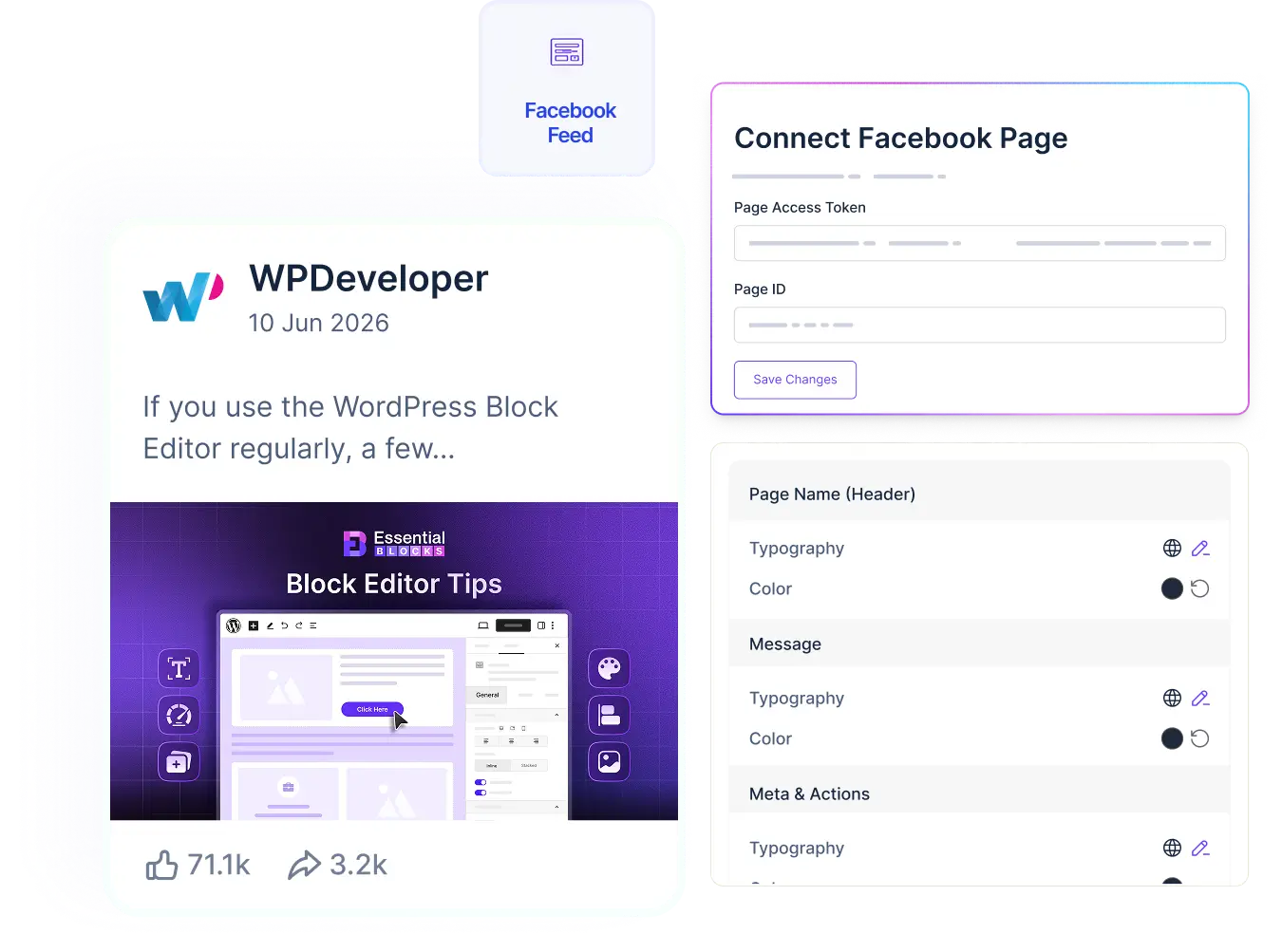
Facebook Feed

Bring Your Facebook Feed Directly Into Gutenberg

Connect your Facebook page and display posts, reactions, and activity right on your WordPress site, fully styled and ready in minutes.

Show Real Social Proof From Your Facebook Page

WPDeveloper

WPDeveloper

Clients care about one kind of project. Let them find it in one click. 🖼️…

Clients care about one kind of project. Let them find it in one click. 🖼️ A filterable portfolio gallery lets visitors sort your work by category, so a wedding couple sees Destination shots and a café owner sees Logo Design, without scrolling past everything else. With the Essential Blocks Filterable Gallery block, you can build one in Gutenberg with no code: ✅ Start from 6 presets like Bento, Mosaic and Flipbook ✅ Add category filters, an "All" button and search ✅ Open projects in a lightbox or link them to case studies ✅ Keep long portfolios fast with Load More Our step-by-step guide also covers how many filters to use, how to prepare your images and the common mistakes to avoid. Build your portfolio 👇
2 reactions
WPDeveloper

WPDeveloper

Your menu is the first conversation your site has with a visitor. Is it helping…

Your menu is the first conversation your site has with a visitor. Is it helping them, or making them guess? 🧭 The new Mega Menu widget in Essential Addons for Elementor lets you build rich dropdowns with links, images and offers, all without code. 🛒 Online stores can show product cards, sale banners and delivery info right in the menu 💻 SaaS sites can list products, resources and docs in clean, scannable columns 👗 Fashion brands can turn the dropdown into a mini storefront You also get: ✅ Inline panels or saved Elementor templates for each item ✅ Hover or click to open, with smooth animations ✅ A mobile accordion that's designed, not squeezed in ✅ Ready presets to start in minutes It's free in Essential Addons and works with free Elementor. See how to build yours 👇
1 reaction
WPDeveloper

WPDeveloper

What if you could just ask Claude to speed up your WordPress site? 🤖 xSpeed…

What if you could just ask Claude to speed up your WordPress site? 🤖 xSpeed Cache, the AI-native caching plugin from WPDeveloper, comes with a built-in WordPress MCP server. Connect Claude or another AI assistant and manage your site's performance through plain conversation. ✅ Check cache status and hit ratio without opening the dashboard ✅ Run benchmarks and change settings right from the chat ✅ Optimize your whole site with one command, with automatic revert if something breaks ✅ Choose read-only or read & write access for every connection ✅ Every action is logged ✅ Free on WordPress.org, MCP server included Our new guide shows you how to connect it to Claude in 4 simple steps, plus the first prompts to try. Read the full guide 👇 https://wpdeveloper.com/wordpress-mcp-server-with-xspeed-cache/
2 reactions
WPDeveloper

WPDeveloper

Your header is the first thing visitors see. Your footer is the last thing they…

Your header is the first thing visitors see. Your footer is the last thing they scroll past. So why leave both to your theme's defaults? 🤔 Meet the new Header & Footer Builder in Essential Addons for Elementor 🎉 Design custom headers and footers visually in Elementor, save them as reusable templates, and deploy them anywhere on your site in seconds. ✅ 6 ready-made presets: Classic, Mega Menu & Shop headers, plus Simple, Modern & Brand footers ✅ 3,000+ more designs with Templately in one click ✅ Display conditions to show a header or footer on the entire site, specific pages, posts or archives ✅ Works with any WordPress theme ✅ Fully responsive, reusable and no code needed No theme hacks. No extra plugin. Just Essential Addons → Theme Builder → Add New Template. Get the full walkthrough here 👇
0 reactions
WPDeveloper

WPDeveloper

WordPress Hosting or Web Hosting: which one does your site actually need? 🤔 Here's the…

WordPress Hosting or Web Hosting: which one does your site actually need? 🤔 Here's the short answer: WordPress hosting is a type of web hosting, not a rival to it. The real difference is how much of the WordPress work your host handles for you. In our beginner-friendly guide, you'll learn: ✅ What each plan actually includes ✅ What the price gap really buys you ✅ When the cheaper plan is the right call ✅ How to pick without regretting it six months later 💡 Quick tip: compare renewal prices, not intro prices. Read the full guide 👇
1 reaction
WPDeveloper

WPDeveloper

Automattic gave its teams one month to build fast. Here's what shipped. ⚡ Radical Speed…

Automattic gave its teams one month to build fast. Here's what shipped. ⚡ Radical Speed Month brought a wave of brand-new WordPress features, from a Mac app that puts the WordPress Agent in your menu bar to a site editor you can simply chat with. Here's a peek at what's inside 👇 🖥️ WordPress Workspace for Mac 💬 Easy Site Editor with a live preview ✍️ Write, a distraction-free editor for writers 🌐 Social Feeds for Bluesky, Mastodon & the Fediverse 🪟 OpenStation, a desktop-style WP Admin We break down all 10 features (plus 2 bonus projects), who each one helps and how to try it safely 👇
1 reaction

Display Your Latest Posts As A Polished List

WPDeveloper

WPDeveloper

Clients care about one kind of project. Let them find it in one click. 🖼️ A filterable portfolio gallery lets…

Clients care about one kind of project. Let them find it in one click. 🖼️ A filterable portfolio gallery lets visitors sort your work by category, so a wedding couple sees Destination shots and a café owner sees Logo Design, without scrolling past everything else. With the Essential Blocks Filterable Gallery block, you can build one in Gutenberg with no code: ✅ Start from 6 presets like Bento, Mosaic and Flipbook ✅ Add category filters, an "All" button and search ✅ Open projects in a lightbox or link them to case studies ✅ Keep long portfolios fast with Load More Our step-by-step guide also covers how many filters to use, how to prepare your images and the common mistakes to avoid. Build your portfolio 👇
2 reactions
WPDeveloper

WPDeveloper

Your menu is the first conversation your site has with a visitor. Is it helping them, or making them guess?…

Your menu is the first conversation your site has with a visitor. Is it helping them, or making them guess? 🧭 The new Mega Menu widget in Essential Addons for Elementor lets you build rich dropdowns with links, images and offers, all without code. 🛒 Online stores can show product cards, sale banners and delivery info right in the menu 💻 SaaS sites can list products, resources and docs in clean, scannable columns 👗 Fashion brands can turn the dropdown into a mini storefront You also get: ✅ Inline panels or saved Elementor templates for each item ✅ Hover or click to open, with smooth animations ✅ A mobile accordion that's designed, not squeezed in ✅ Ready presets to start in minutes It's free in Essential Addons and works with free Elementor. See how to build yours 👇
1 reaction
WPDeveloper

WPDeveloper

What if you could just ask Claude to speed up your WordPress site? 🤖 xSpeed Cache, the AI-native caching plugin…

What if you could just ask Claude to speed up your WordPress site? 🤖 xSpeed Cache, the AI-native caching plugin from WPDeveloper, comes with a built-in WordPress MCP server. Connect Claude or another AI assistant and manage your site's performance through plain conversation. ✅ Check cache status and hit ratio without opening the dashboard ✅ Run benchmarks and change settings right from the chat ✅ Optimize your whole site with one command, with automatic revert if something breaks ✅ Choose read-only or read & write access for every connection ✅ Every action is logged ✅ Free on WordPress.org, MCP server included Our new guide shows you how to connect it to Claude in 4 simple steps, plus the first prompts to try. Read the full guide 👇 https://wpdeveloper.com/wordpress-mcp-server-with-xspeed-cache/
2 reactions

Let Posts Flow In An Auto-Scrolling Carousel

Keep Visitors Scrolling With A Masonry Feed

WPDeveloper

WPDeveloper

Clients care about one kind of project. Let them find…

Clients care about one kind of project. Let them find it in one click. 🖼️ A filterable portfolio gallery lets visitors sort your work by category, so a wedding couple sees Destination shots and a café owner sees Logo Design, without scrolling past everything else. With the Essential Blocks Filterable Gallery block, you can build one in Gutenberg with no code: ✅ Start from 6 presets like Bento, Mosaic and Flipbook ✅ Add category filters, an "All" button and search ✅ Open projects in a lightbox or link them to case studies ✅ Keep long portfolios fast with Load More Our step-by-step guide also covers how many filters to use, how to prepare your images and the common mistakes to avoid. Build your portfolio 👇
2 reactions
WPDeveloper

WPDeveloper

Your menu is the first conversation your site has with…

Your menu is the first conversation your site has with a visitor. Is it helping them, or making them guess? 🧭 The new Mega Menu widget in Essential Addons for Elementor lets you build rich dropdowns with links, images and offers, all without code. 🛒 Online stores can show product cards, sale banners and delivery info right in the menu 💻 SaaS sites can list products, resources and docs in clean, scannable columns 👗 Fashion brands can turn the dropdown into a mini storefront You also get: ✅ Inline panels or saved Elementor templates for each item ✅ Hover or click to open, with smooth animations ✅ A mobile accordion that's designed, not squeezed in ✅ Ready presets to start in minutes It's free in Essential Addons and works with free Elementor. See how to build yours 👇
1 reaction
WPDeveloper

WPDeveloper

What if you could just ask Claude to speed up…

What if you could just ask Claude to speed up your WordPress site? 🤖 xSpeed Cache, the AI-native caching plugin from WPDeveloper, comes with a built-in WordPress MCP server. Connect Claude or another AI assistant and manage your site's performance through plain conversation. ✅ Check cache status and hit ratio without opening the dashboard ✅ Run benchmarks and change settings right from the chat ✅ Optimize your whole site with one command, with automatic revert if something breaks ✅ Choose read-only or read & write access for every connection ✅ Every action is logged ✅ Free on WordPress.org, MCP server included Our new guide shows you how to connect it to Claude in 4 simple steps, plus the first prompts to try. Read the full guide 👇 https://wpdeveloper.com/wordpress-mcp-server-with-xspeed-cache/
2 reactions
WPDeveloper

WPDeveloper

Your header is the first thing visitors see. Your footer…

Your header is the first thing visitors see. Your footer is the last thing they scroll past. So why leave both to your theme's defaults? 🤔 Meet the new Header & Footer Builder in Essential Addons for Elementor 🎉 Design custom headers and footers visually in Elementor, save them as reusable templates, and deploy them anywhere on your site in seconds. ✅ 6 ready-made presets: Classic, Mega Menu & Shop headers, plus Simple, Modern & Brand footers ✅ 3,000+ more designs with Templately in one click ✅ Display conditions to show a header or footer on the entire site, specific pages, posts or archives ✅ Works with any WordPress theme ✅ Fully responsive, reusable and no code needed No theme hacks. No extra plugin. Just Essential Addons → Theme Builder → Add New Template. Get the full walkthrough here 👇
0 reactions
WPDeveloper

WPDeveloper

WordPress Hosting or Web Hosting: which one does your site…

WordPress Hosting or Web Hosting: which one does your site actually need? 🤔 Here's the short answer: WordPress hosting is a type of web hosting, not a rival to it. The real difference is how much of the WordPress work your host handles for you. In our beginner-friendly guide, you'll learn: ✅ What each plan actually includes ✅ What the price gap really buys you ✅ When the cheaper plan is the right call ✅ How to pick without regretting it six months later 💡 Quick tip: compare renewal prices, not intro prices. Read the full guide 👇
1 reaction
WPDeveloper

WPDeveloper

Automattic gave its teams one month to build fast. Here's…

Automattic gave its teams one month to build fast. Here's what shipped. ⚡ Radical Speed Month brought a wave of brand-new WordPress features, from a Mac app that puts the WordPress Agent in your menu bar to a site editor you can simply chat with. Here's a peek at what's inside 👇 🖥️ WordPress Workspace for Mac 💬 Easy Site Editor with a live preview ✍️ Write, a distraction-free editor for writers 🌐 Social Feeds for Bluesky, Mastodon & the Fediverse 🪟 OpenStation, a desktop-style WP Admin We break down all 10 features (plus 2 bonus projects), who each one helps and how to try it safely 👇
1 reaction
WPDeveloper

WPDeveloper

7 out of 10 shoppers who start checkout never finish.…

7 out of 10 shoppers who start checkout never finish. 🛒 That's not a traffic problem. It's a checkout problem. Hidden fees, forced sign-ups, long forms and too few payment options quietly drain revenue you've already earned. In fact, better checkout design alone could lift conversions by up to 35%. In our latest guide, we break down: ✅ The 6 biggest checkout leaks on WordPress & Elementor stores ✅ How to find exactly where shoppers drop off ✅ A 10-step fix list + a quick checkout audit checklist ✅ How Better Payment removes payment-step friction, no code needed Read the full guide 👇
1 reaction
WPDeveloper

WPDeveloper

🎉 The Essential Blocks dashboard just got a complete makeover!…

🎉 The Essential Blocks dashboard just got a complete makeover! We rebuilt it from scratch so building with Gutenberg feels faster, cleaner and a lot more fun. Here’s what’s waiting in your WordPress dashboard: 🌗 Light or dark theme: pick the one you like ⚡ Turn 70+ blocks on or off. Disabled blocks never load on your site 🎨 Ready-made templates with Templately, right inside the dashboard 🔗 Connect your favourite services from one place 🚀 Install, build your first page and go live in minutes Watch the quick tour 👆 then update Essential Blocks and try it yourself. 👇 Grab the latest version from the link in the comments!
8 reactions
WPDeveloper

WPDeveloper

Hola from Barcelona 🇪🇸 This week, our founder, M Asif…

Hola from Barcelona 🇪🇸 This week, our founder, M Asif Rahman, is at PressConf EU 2026! It’s the first-ever European edition of the conference, built for the people who run the business side of WordPress. 🌍 What makes PressConf special? It’s intimate. There’s no giant expo hall, just a sold-out room of founders, agencies, product teams and hosting companies, having honest conversations about what’s working (and what isn’t) in the WordPress world. 🤝 And this year, one topic is everywhere: AI 🤖 🎙️ How AI is changing the open web and open source 💬 What happens to company culture when AI joins the team 🧠 How WordPress professionals can stand out as the market shifts 🤖 And yes, an AI assistant is actually one of the speakers For us at WPDeveloper, this hits close to home. Our products are serving 6 million+ WordPress users, and we’re busy building smarter, AI-powered experiences for all of you. 💙 Being in the room where the future of WordPress is being discussed helps us build better for you. Thank you, PressConf, for bringing the community together in such a beautiful city. 🌴 👇 Your turn: what’s one thing you’d love AI to do for your WordPress site? Tell us in the comments!
15 reactions

Customize Every Detail Of The Effect

Content Display Control

Toggle the profile image, page name, timestamp, and message on or off per card. Set a message word limit to keep longer posts tidy. Control visibility for reactions, comments, and share counts. Enable pagination, link posts back to Facebook, and choose whether they open in a new tab.

Filter by Posts

Filter by post type, images, videos, links, or all. Use keyword filtering to surface posts with specific text, and hashtag filtering to highlight posts from a campaign or topic.

Card Styling

Set a background color, pick a border style, and control border color and width per side. Adjust border radius for sharp or rounded cards, and add a box shadow with separate normal and hover states.

Typography & Color Control

Customize typography and colors for every part of the feed, page names, post content, timestamps, and engagement details, so your Facebook Feed always looks consistent with your site’s brand identity.

Mobile Responsive

Your Facebook Feed adapts automatically to any screen size. Posts reflow cleanly across desktop, tablet, and mobile, so your feed looks just as polished on a phone as it does on a full-width layout.

A Quick Tutorial On How To Set Up Facebook Feed In Gutenberg

Frequently Asked Questions

Still Need Help? Reach out to our dedicated support team anytime

What themes does Essential Blocks for Gutenberg work with?

Essential Blocks for Gutenberg supports almost all themes that are compatible with Gutenberg.

What are the requirements to use Essential Blocks for Gutenberg?

To use Essential Blocks you need to have a WordPress website that uses the default Gutenberg editor.

Will Essential Blocks slow down my website?

No, Essential Blocks will not slow down your website. It brings you the outstanding facility of complete modular control over the activation of each individual block. We have also used optimized codes for this plugin which helps to load only the resources that are currently using. These advanced facilities will boost your site speed even further.

Can I use Essential Blocks PRO on multiple websites?

Yes! Once you upgrade your plan accordingly, you can use Essential Blocks PRO on multiple websites.

Do you have a refund option?

Absolutely! We take pride in customer satisfaction. Thus, we are offering you a risk-free 14-day money-back guarantee. If you are not happy with Essential Blocks PRO within this period, we will happily refund your money.

What will happen after my license expires?

You can still use all of our premium features once the license expires, except you will just not get new premium updates and support. Don’t worry, we will notify you to renew your license.

Elevate Your Web Design & Development In Gutenberg 
With Essential Blocks

No worries! We offer 100% No-Risk Money Back Guarantee only
if you’re not satisfied enough.

  • Feature Item 1

  • Feature Item 2

  • Feature Item 3

  • Feature Item 4

  • Feature Item 5

Essential Blocks- gutenberg

This plugin, which I’ve been using for several years, brings incredible features to WordPress to enhance the look of a website, without any programming.
Furthermore, their support was very effective in fixing a bug.
Thank you again and congratulations.

Essential Blocks

Advanced Blocks Library For Gutenberg To Power Up Your Site With Interactive Content

Subscription Form

Copyright © 2026 | A WPDeveloper Product from startise-logo family

Hosted with xCloud-logo