
If you are still manually updating the same text, buttons, author info, links and post details across multiple pages, you are wasting time and creating more room for errors. That is exactly where dynamic tag management changes the game. Instead of hardcoding repeated content across pages, you can pull live data from your site and display it automatically wherever needed.
For modern site owners, marketers and developers, a dynamic tag is no longer a nice-to-have workflow improvement. It is a smarter way to keep content accurate, scalable and easier to manage dynamic tags in WordPress environments, especially inside the block editor. In this guide, you will learn what dynamic tag management is, how it works, why this functionality matters in Gutenberg and how to use it more effectively on a WordPress website.
TL;DR (Quick Summary)
Too long? Didn’t read? Here is a quick summary of what you will find in the blog post.
| Topic | Quick Takeaway | Why It Matters |
| Dynamic tag management | It lets you insert auto-updating content pulled from site data, post data, user data, queries, or custom fields | Reduces manual edits and keeps content consistent |
| Dynamic tag | A placeholder that displays live information such as post title, author name, featured image, custom field, or archive term | Makes pages smarter and more reusable |
| Static vs dynamic | Static content stays the same until manually changed, while dynamic content updates based on rules or data sources | Saves time and supports personalization |
| WordPress use case | In WordPress, dynamic tags are useful for templates, blog layouts, author boxes, CTA buttons, forms and custom post types | Helps scale content-heavy websites efficiently |
| Gutenberg workflow | A Gutenberg dynamic tag setup makes the native block editor more flexible without relying on repetitive manual changes | Improves workflow for content teams |
| Essential Blocks | Essential Blocks offers Dynamic Tags support to pull data from sources like Current Post, Other Posts, Site, Query, Terms and Tags | Makes dynamic content easier to implement in Gutenberg. |
What Is Dynamic Tag Management?
Dynamic tag management is the process of using dynamic placeholders, called dynamic tags, to pull information automatically from a website’s data sources and display it in content elements such as headings, buttons, author boxes, forms, product sections, archive pages, or custom templates. Instead of typing every detail manually, you define a source once and the front end displays the right value wherever that tag is used. In simple terms, a dynamic tag acts like a live content connector between your design and your site data.

For example, instead of manually writing the post title on every template, you can insert a dynamic tag that fetches the current post title automatically. Instead of updating an author bio on dozens of posts, you can display the author’s profile info dynamically. The same applies to CTA links, category names, custom field data and site-level information.
Difference Between Static Content & Dynamic Tags
Static content and dynamic content may look similar on the front end, but they behave very differently behind the scenes. Static content is manually written into each page or block. Dynamic tags, on the other hand, pull information from a predefined source and update automatically when the source changes.
This difference becomes especially important when your website grows. A five-page brochure site can survive on manual updates, but a blog, magazine, agency site, LMS, membership platform, or WooCommerce store benefits far more from a dynamic structure. That is where dynamic tags in WordPress workflows become a practical advantage rather than a technical extra.
| Aspect | Static Content | Dynamic Tags |
| Update method | Must be edited manually in each location | Updates automatically when source data changes |
| Scalability | Hard to maintain across many posts or templates | Ideal for large, growing websites |
| Consistency | Easy to create mismatches or outdated details | Keeps repeated content uniform |
| Personalization | Limited and mostly manual | Can adapt content based on post, user, query, or site data |
| Workflow efficiency | Slower for teams and repetitive tasks | Faster, cleaner and more reusable |
Why Dynamic Content Matters for Modern Websites
Modern websites are no longer digital brochures. They are content ecosystems. Visitors expect timely information, relevant offers, personalized experiences and clean navigation. That expectation is one reason dynamic content matters so much today. When used properly, dynamic tag systems help site owners deliver the right content in the right place without constantly rebuilding pages from scratch.
Personalization is also tied to measurable business impact: McKinsey reports that effective personalization can lift revenues by 5–15% and increase marketing ROI by 10–30%, while faster-growing companies derive 40% more of their revenue from personalization than slower-growing competitors.
Here’s how dynamic tag management improves real-world WordPress workflows:
Keeps Content Fresh
A website with dozens or hundreds of pages becomes hard to maintain when every update must be made one by one. Dynamic content solves that by turning repeated elements into live references. Update the source once and the output changes wherever the tag appears.
Improves Relevancy
A dynamic site can show different information based on the current post, taxonomy, author, query, or custom field. That makes pages more relevant without requiring separate page versions for every use case.
Supports Better Conversion
Dynamic CTAs, personalized messages and context-aware blocks can improve response rates because they feel more relevant to the user. HubSpot found that personalized CTAs converted 202% better than basic CTAs after analyzing more than 330,000 CTAs over six months.
Makes Large Websites Easier to Manage
When a CMS powers a high volume of pages, archives, posts and categories, reusable logic matters more than manual page building. Since WordPress powers 42.2% of all websites and 59.6% of websites with a known CMS, scalable publishing workflows are especially important in the WordPress ecosystem.
Strengthens Content Consistency
When author names, featured labels, taxonomies and internal links are handled dynamically, the site looks more polished and trustworthy. That matters for both user experience and editorial control.
Benefits of Dynamic Tag Management for WordPress Websites
For a WordPress website, dynamic content is not only about automation, but it is also about building a more maintainable system. Whether you run a blog, a business site, a directory, or a client project, dynamic tag management gives structure to your content workflow and reduces unnecessary repetition.
Faster Content Updates
Suppose your site uses the same author bio, business address, featured CTA, or custom offer in multiple places. With static editing, every update becomes a search-and-replace job. With dynamic tags, you update the source and the website reflects the new information automatically.
Better Reusability
A reusable layout becomes far more powerful when the content inside is dynamic. Instead of duplicating blocks and rewriting text each time, you can design once and let the data populate itself. This is especially valuable for blog post templates, archive cards, hero sections and author boxes.
More Accurate Data Display
Manual input often leads to inconsistencies. A page might show an outdated post title, a wrong category link, or an old call-to-action URL. Dynamic tags reduce that risk by pulling data directly from the source.
Easier Management of Custom Fields
If you use custom fields for product specs, service highlights, event details, or contributor information, dynamic tags let you display that structured data cleanly on the front end. This is one of the most practical reasons people explore dynamic tags in WordPress workflows.

Stronger Team Efficiency
Writers, editors, marketers and site managers work faster when content logic is centralized. Instead of giving every team member a long checklist of manual updates, you create a smarter publishing system that handles repeated data automatically.
Popular Use Cases of Dynamic Tag Management
Dynamic tag management becomes most useful when you apply it to real website workflows. The more repetitive the content structure is, the more value dynamic tags create. On a WordPress site, that can range from blog metadata to landing page components and custom post type templates.
- Post titles and featured content blocks: Use a dynamic tag to display the current post title, excerpt, or featured image automatically in templates. Example: A single-post layout displays the correct hero title for every article without manual editing.
- Author profile sections: Pull the author’s name, photo and bio directly from profile data. Example: every blog post ends with a consistent author box that updates if the author changes their profile information.
- Custom field output: Display values stored in custom fields for services, products, portfolios, or events. Example: A real estate listing template dynamically shows price, location, square footage and contact details.
- Dynamic CTA buttons: Use context-aware button text or links based on the current page, post type, or selected source. Example: A “Read More” button automatically links to the related post or service detail page.
- Taxonomy-driven content: Show category names, tags, or terms dynamically. Example: A magazine site template displays the current topic category above every article header.
- Archive and query-based sections: Populate layouts using query results or filtered content blocks. Example: A blog archive page automatically shows the latest posts from a selected category.
- Forms and user-specific content: Dynamic fields can help prefill or structure forms based on selected values. Example: A contact form pulls the service name from the page the user is visiting.
- Site-wide business information: Reuse brand name, phone number, email address, or social links dynamically. Example: Update the company phone number once and have it change everywhere on the site.
How Essential Blocks Simplifies Dynamic Tag Management in Gutenberg

If you use the default WordPress block editor, Essential Blocks is a major Gutenberg block library designed to expand the native editing experience. On its plugin page, it is described as an “ultimate Gutenberg blocks library” with 70+ blocks and advanced features, including Dynamic Tags and ACF support.
Its Dynamic Tags feature is designed to display content that updates automatically based on predefined parameters. The feature can pull data from multiple sources and help with use cases such as author profiles, automatically generated form fields, dynamic CTA buttons and ACF-powered content
How to Add a Dynamic Tag in Gutenberg with Essential Blocks
Since Essential Blocks provide a specific dynamic tag feature, in this part, let us have a look at how it will work in your Gutenberg editor.
Step 1: Add a Supported Block in Gutenberg
Open the page or post in the Gutenberg editor and insert a supported Essential Blocks element. In the documentation example, Essential Blocks uses the Advanced Heading block, though it also mentions use with blocks like buttons, forms and progress bars.
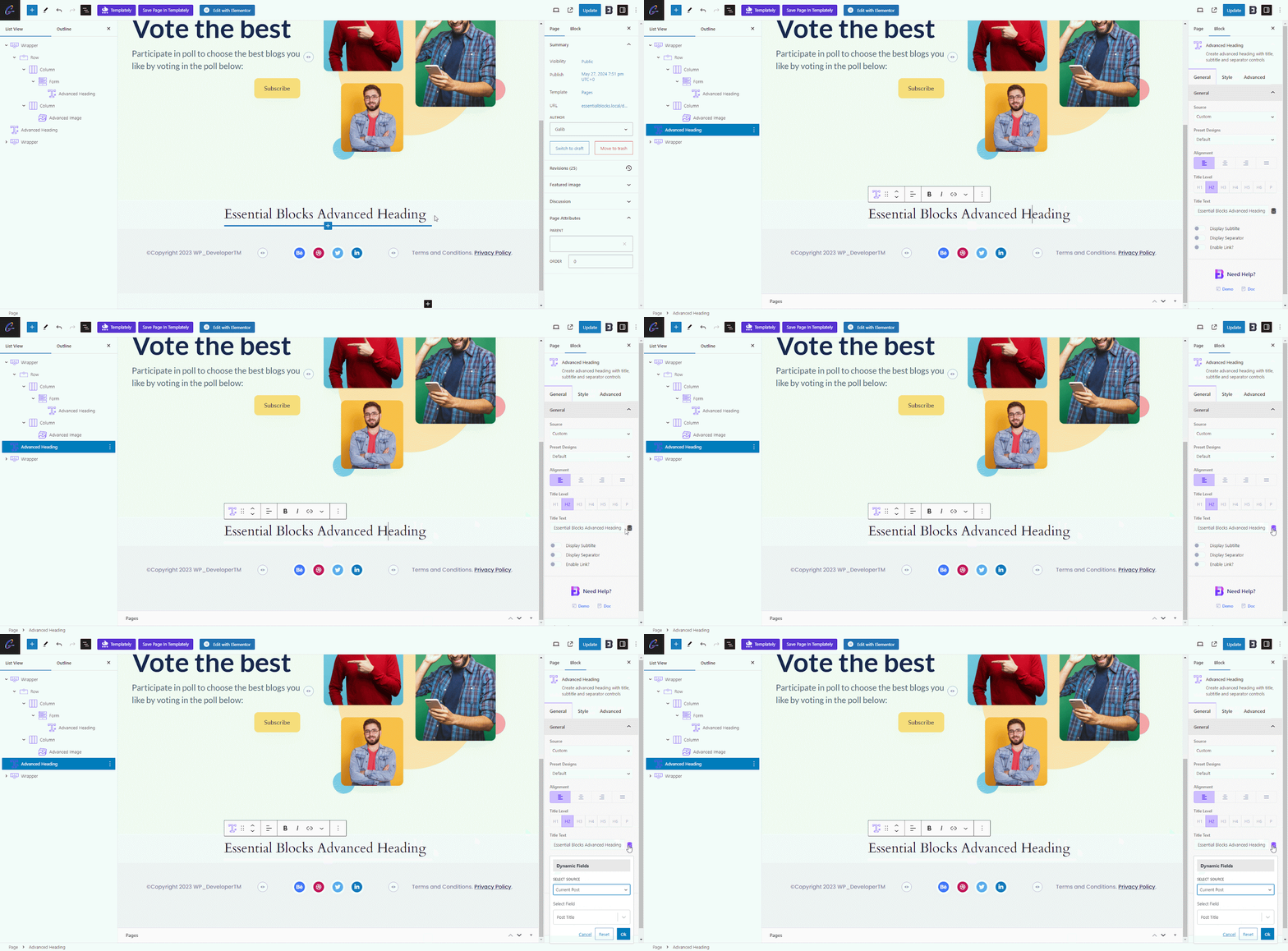
Step 2: Click the Dynamic Tags
Inside the selected block settings, click the Dynamic Tags icon next to the content field you want to make dynamic. Then choose the source of the data. Essential Blocks lists six source options: Current Post, Other Posts, Site, Query, Terms and Tags. For example, if you choose Current Post and then select Post Title, the block will automatically display the title of the post you are currently editing.
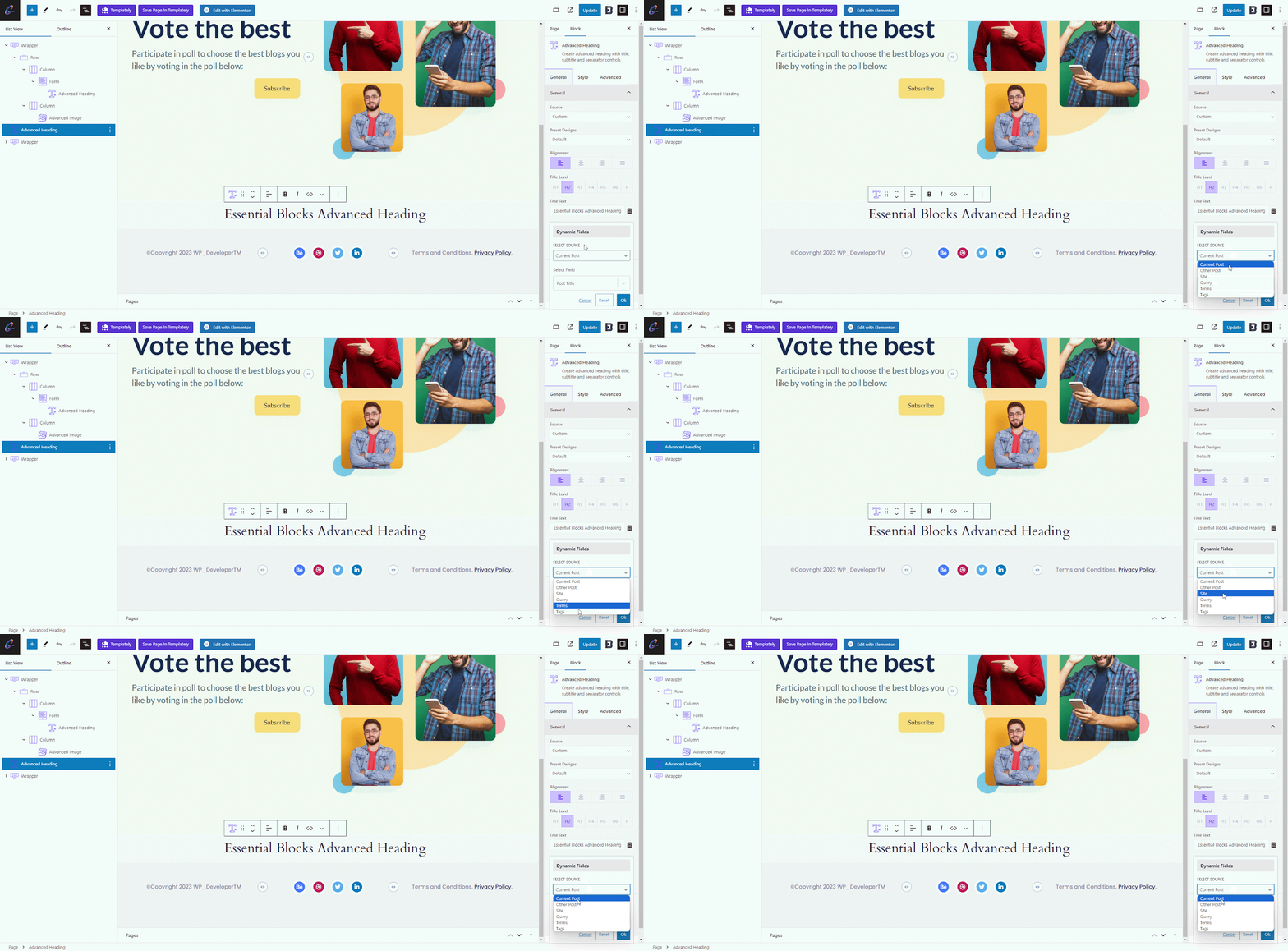
Step 3: Confirm the Field
After selecting the correct field and confirming the setup, the block will output live content based on the chosen source. Essential Blocks also notes that you can integrate Advanced Custom Fields (ACF) so that custom text, images and other data can appear dynamically on the front end. In practical terms, this means your Gutenberg dynamic tag workflow becomes far easier because you can build once and rely on automatic updates later.
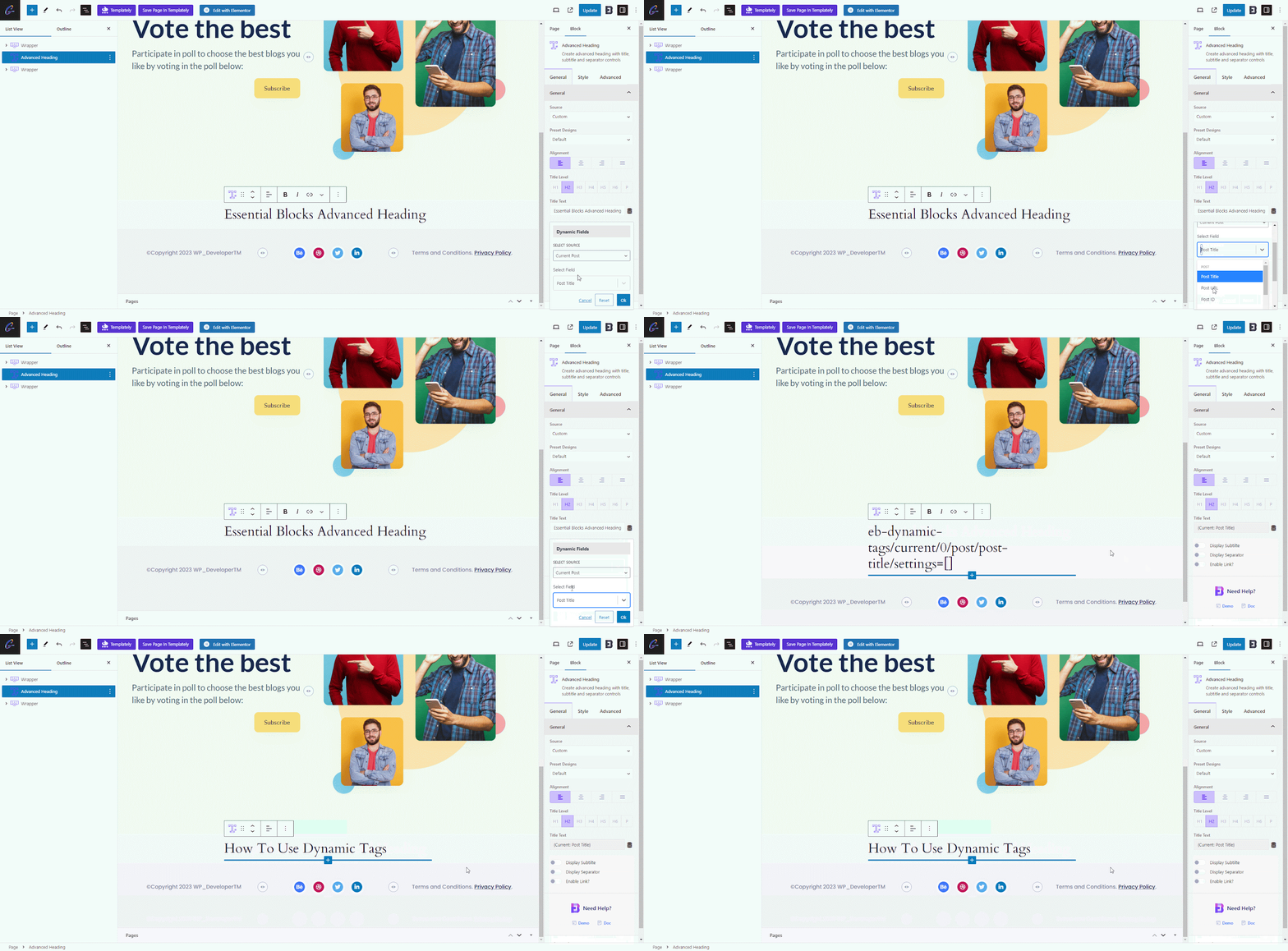
To understand the full process, check the documentation.
Best Practices for Dynamic Tag Management in WordPress
Dynamic content is powerful, but it works best when planned well. A messy dynamic setup can become confusing fast. The goal is not to make everything dynamic. The goal is to make the right things dynamic so your website stays scalable, readable and reliable.
Use Dynamic Tags for Repeated Information
Reserve dynamic tags for information that appears in multiple places or belongs to a predictable data structure. Good examples include post titles, author bios, category labels, custom fields, CTA links and business contact details.
Example: Instead of typing a service name into every callout box manually, store it in a custom field and display it dynamically where needed.
Keep Source Data Clean And Consistent
A dynamic tag is only as good as the data behind it. If your custom fields are incomplete or inconsistent, the output will be messy too. Set naming rules for fields, author profiles, categories and shared site options.
Example: If one author profile has a headshot and another doesn’t, your author box layout may look broken across posts.
Build Reusable Templates Instead of One-Off Layouts
Dynamic tag management works best when paired with reusable design logic. Use consistent block patterns or templates so the dynamic data has a clear structure to live in.
Example: Create a single post header template that always pulls the featured image, category, post title and author name automatically.
Always Check Fallback Behavior
Sometimes a field is empty. Sometimes a post has no featured image. Sometimes a taxonomy is missing. Good dynamic design anticipates those gaps.
Example: If a testimonial custom field is blank, you may want the section to hide gracefully rather than show an empty label.
Balance Automation with Editorial Control
Not every sentence should be dynamic. Static copy still matters for messaging clarity, brand tone and persuasive flow. Use dynamic tags to support the experience, not replace thoughtful writing.
Example: Keep the main sales message static, but use dynamic values for package name, pricing label, author info, or related content links.
Common Challenges in Dynamic Tag Management
Dynamic systems make websites smarter, but they also introduce new decisions. Most problems do not come from the tags themselves. They come from unclear structure, poor data hygiene, or overcomplicating the setup.
Choosing the Wrong Source Data
A common issue is selecting a tag source that does not match the content goal. For example, using current post data where site-wide data is needed can create unexpected results.
Why it happens: Users often focus on the visible output rather than the logic behind the source.
Empty Or Incomplete Fields
If a dynamic value relies on a missing custom field, a missing profile detail, or an incomplete taxonomy setup, the front end may display nothing or produce awkward spacing.
Why it matters: Dynamic output exposes backend inconsistency very quickly.
Overusing Dynamic Content
Some site owners try to make every element dynamic. That usually creates an experience that is harder to debug and sometimes less persuasive from a copywriting standpoint.
Why it matters: Too much automation can reduce clarity and make layouts harder to manage.
Plugin Compatibility And Feature Limits
Not every plugin or block supports the same dynamic workflows. Some setups work beautifully with custom fields and query data, while others need additional configuration.
Why it matters: Before building heavily with dynamic tags, confirm your chosen blocks and plugins support the data sources you need.
Debugging Becomes More Logical Than Visual
When a heading looks wrong, the problem may not be the heading itself. It may be the selected source, field mapping, or empty database value behind it.
Why it matters: Fixing dynamic content often requires tracing the data path rather than simply editing text on the page.
Start Using Dynamic Tag Management to Build Smarter WordPress Experiences
If your website is growing, manual content management will eventually slow you down. Dynamic tag management gives you a better way to handle repeated information, structured data and scalable layouts without sacrificing flexibility. Whether you are managing a blog, agency site, online publication, or custom content project, dynamic tags help you reduce repetitive edits and create a cleaner publishing workflow.
The smartest way to begin is with a few high-impact use cases: post titles, author boxes, CTA buttons, custom fields and taxonomy labels. From there, you can expand into more advanced dynamic tags for WordPress workflows inside the block editor.
If you liked our blog, then subscribe to our blog for all the latest updates and join our Facebook community to stay connected with new features, tips and announcements.