You land on a website to sign up for a service, request a quote or register for an event and you are greeted by a massive wall of text boxes. It looks like a tax return document. You sigh, close the tab and move on to a competitor. This is exactly what you want to avoid on your own website. The solution to this problem is using Multi-Page WordPress Forms.
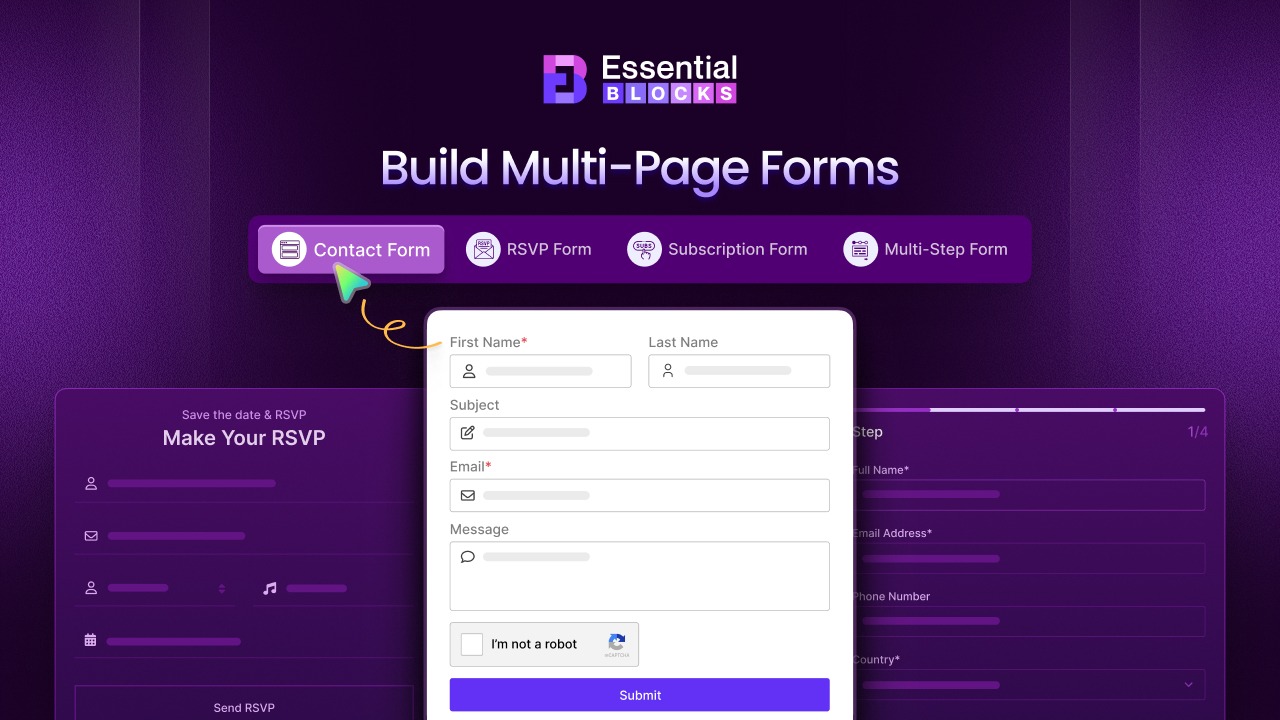
In this guide, we will explore 3+ stunning templates to design Multi‑Page WordPress Forms using Essential Blocks. We will look at why these forms work better, how to build them without writing a single line of code and the specific templates you can use today to boost your conversions.
Why Do You Need Multi-Page WordPress Forms for Your Website?
The way you present questions to your visitors matters just as much as the questions themselves. A Multi-Page WordPress Form splits a long form into several steps or pages. This simple change in WordPress Form Design can have a dramatic impact on your user experience and your bottom line. It transforms a tedious task into an interactive journey.
Reduces Cognitive Load for Users
When a user sees twenty empty fields at once, they feel overwhelmed. This is called cognitive load. Their brain has to process too much information before they even type their first name. By using a Multi-step form WordPress layout, you show them only three or four fields at a time. This makes the task look easy and quick to complete. It encourages them to start the process because the commitment feels small. It creates a psychological ease that single-page forms simply cannot match.
Increases Conversion Rates
Data consistently shows that multi-step forms outperform single-page forms for long data entry tasks. According to research by HubSpot, optimizing your form design is one of the most effective ways to increase lead capture. When users start a form, they naturally want to finish it. This psychological principle helps drive them through the steps until they hit the submit button. A well-designed form keeps the momentum going and reduces friction at every step.
Better Data Organization
From a website owner’s perspective, these forms help you categorize information. You can group contact details on step one, shipping address on step two and payment info on step three. This logical flow helps the user understand exactly what is being asked of them. It results in more accurate data because the user is focused on one specific category of information at a time. It prevents the confusion that often leads to typos or incorrect entries.
Reduces Form Abandonment
Form abandonment happens when a user starts filling out a form but quits halfway through. This is a nightmare for Lead generation. Multi-page WordPress Forms often use a Progress bar to show the user exactly how far along they are. Seeing a bar that is 50% complete motivates the user to finish the task rather than quitting. It gives them a sense of accomplishment as they move through the steps. It turns the boring task of data entry into a visually rewarding process.
Introducing Essential Blocks Form Block: The No-Code Solution
You might think that building a complex multi-step form requires expensive plugins or hiring a developer. That used to be true, but now you can create WordPress forms without coding using Essential Blocks. This plugin enhances the default Gutenberg editor and gives you powerful design tools right inside your dashboard.
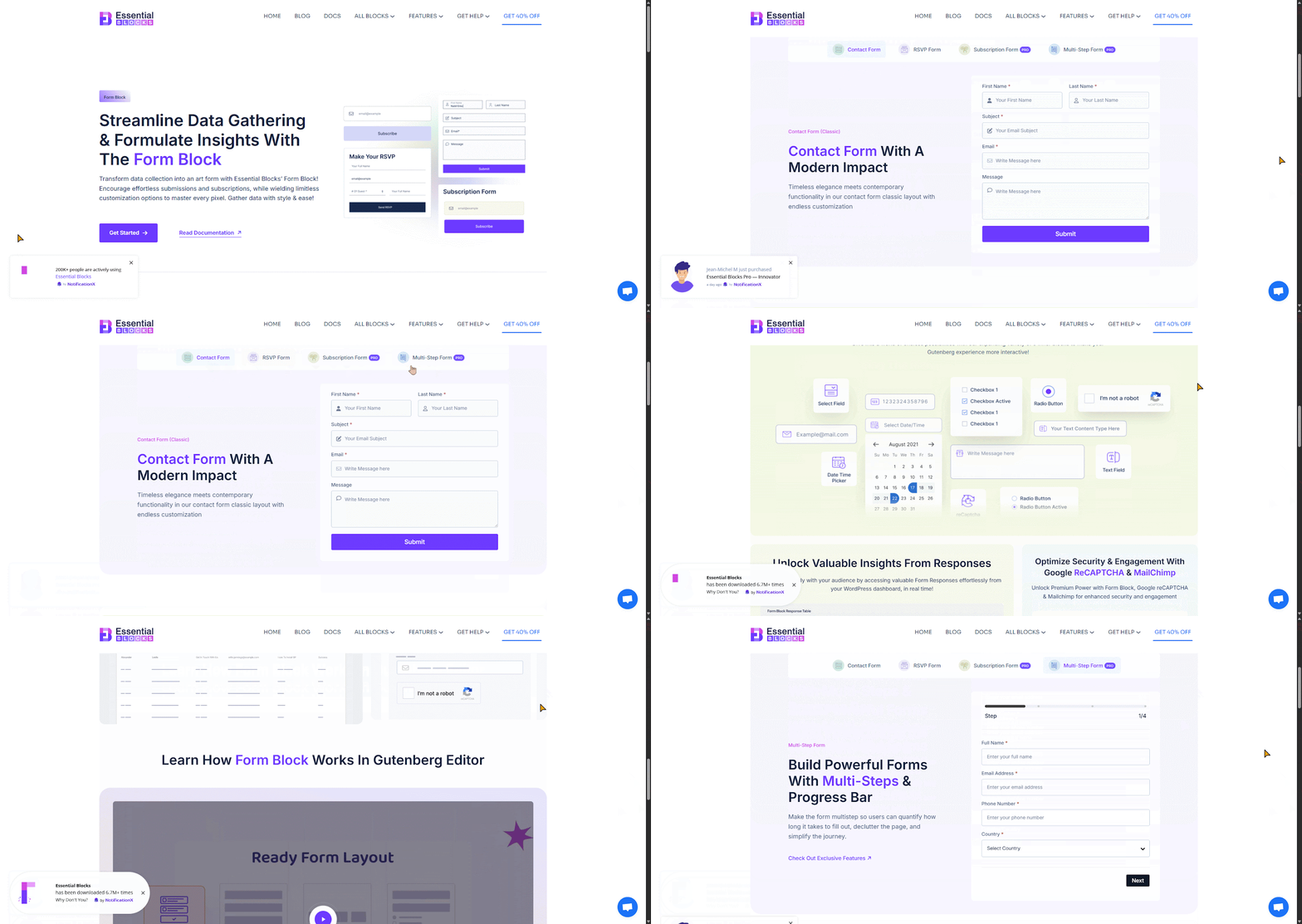
The Form Block from Essential Blocks is a game-changer for ‘No Code WordPress Forms’. It is designed for marketers, business owners and creators who need professional results without the technical headache. You do not need to know HTML or CSS to make it look good. You simply drag and drop elements where you want them. It democratizes web design by putting the power of advanced functionality into the hands of beginners.
3+ Stunning Templates to Design Multi-Page WordPress Forms
Creating forms from scratch can be hard, but Essential Blocks makes it easy. These ready‑made layouts can be imported instantly and turned into multi‑page forms that look professional and are easy to use. Here are four templates you can start using right away.
Multi‑Step Form
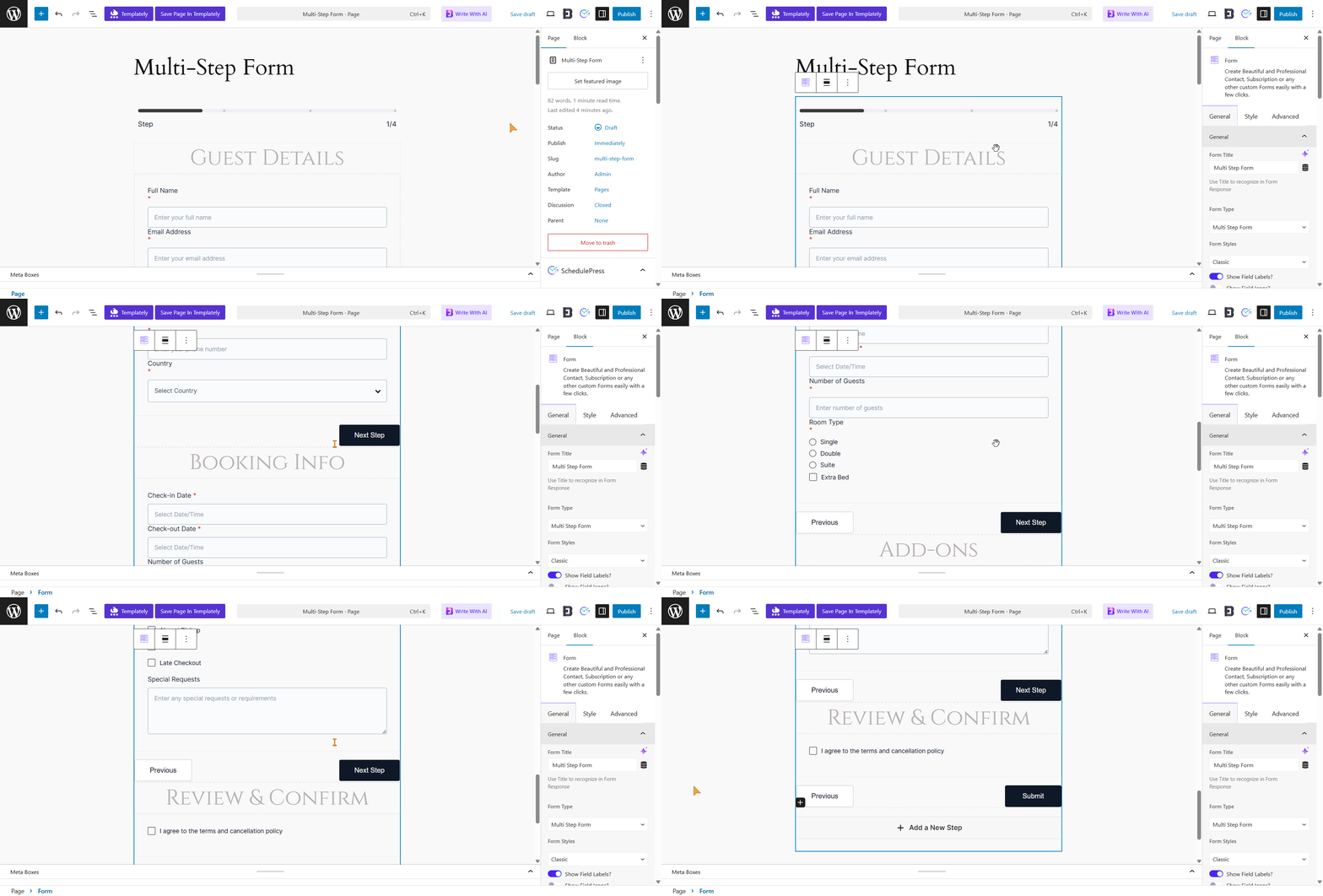
This template is perfect for long forms because it breaks complex booking tasks into smaller, manageable steps. Visitors do not feel overwhelmed since personal information is collected first, followed by booking dates. A progress bar at the top shows users exactly how far they have come, while mobile‑friendly checkboxes make it simple to select room types on any device.
Classic Contact Form
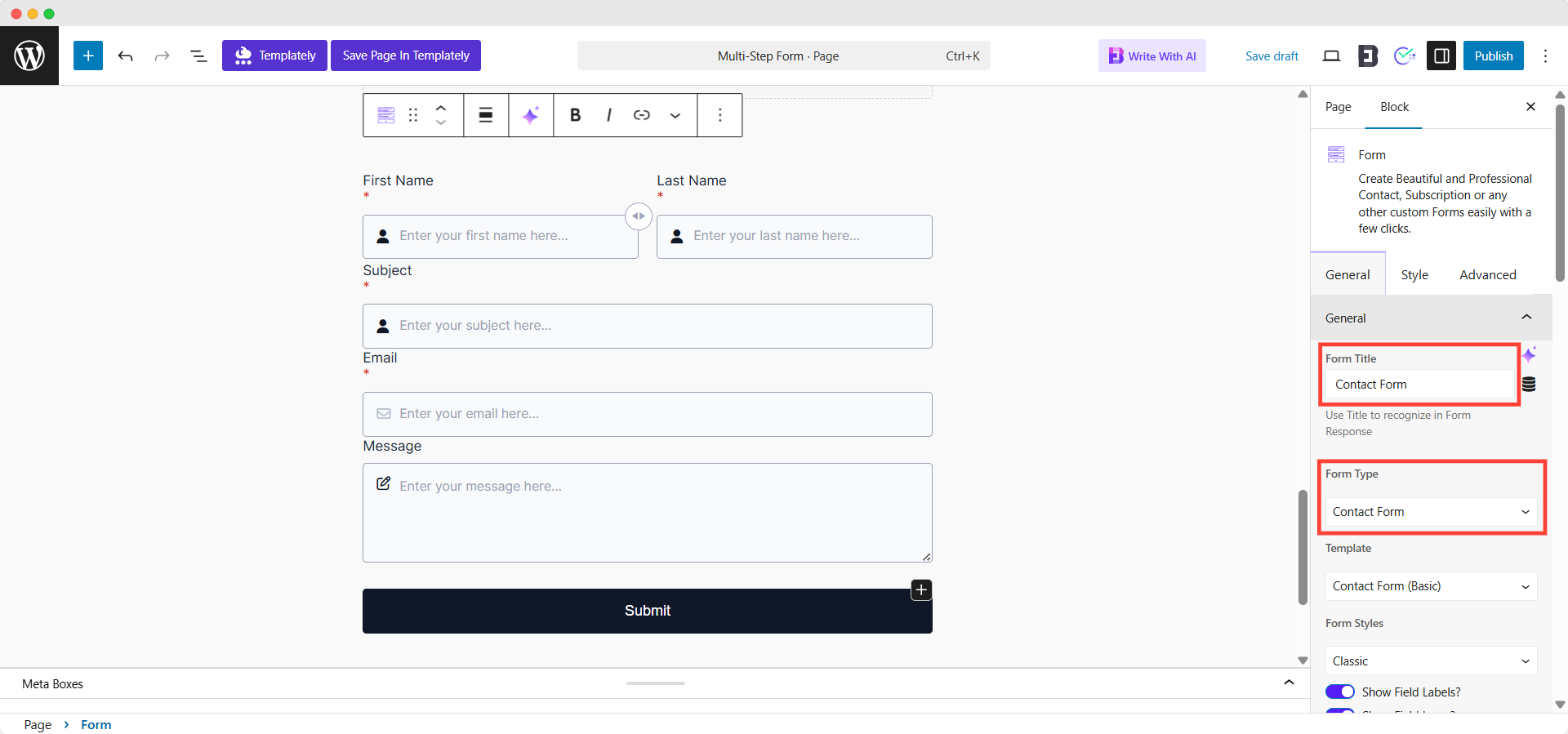
The classic contact form is simple, clean, and works for any website. You can easily split it into two pages, asking for an email on the first page and the message on the second to capture leads more effectively. Its minimal design fits any brand style, while the generous white space gives it a professional and trustworthy look. You can also add a dropdown menu to route messages to the right team, making it flexible and practical for businesses of all sizes.
Modern RSVP Form
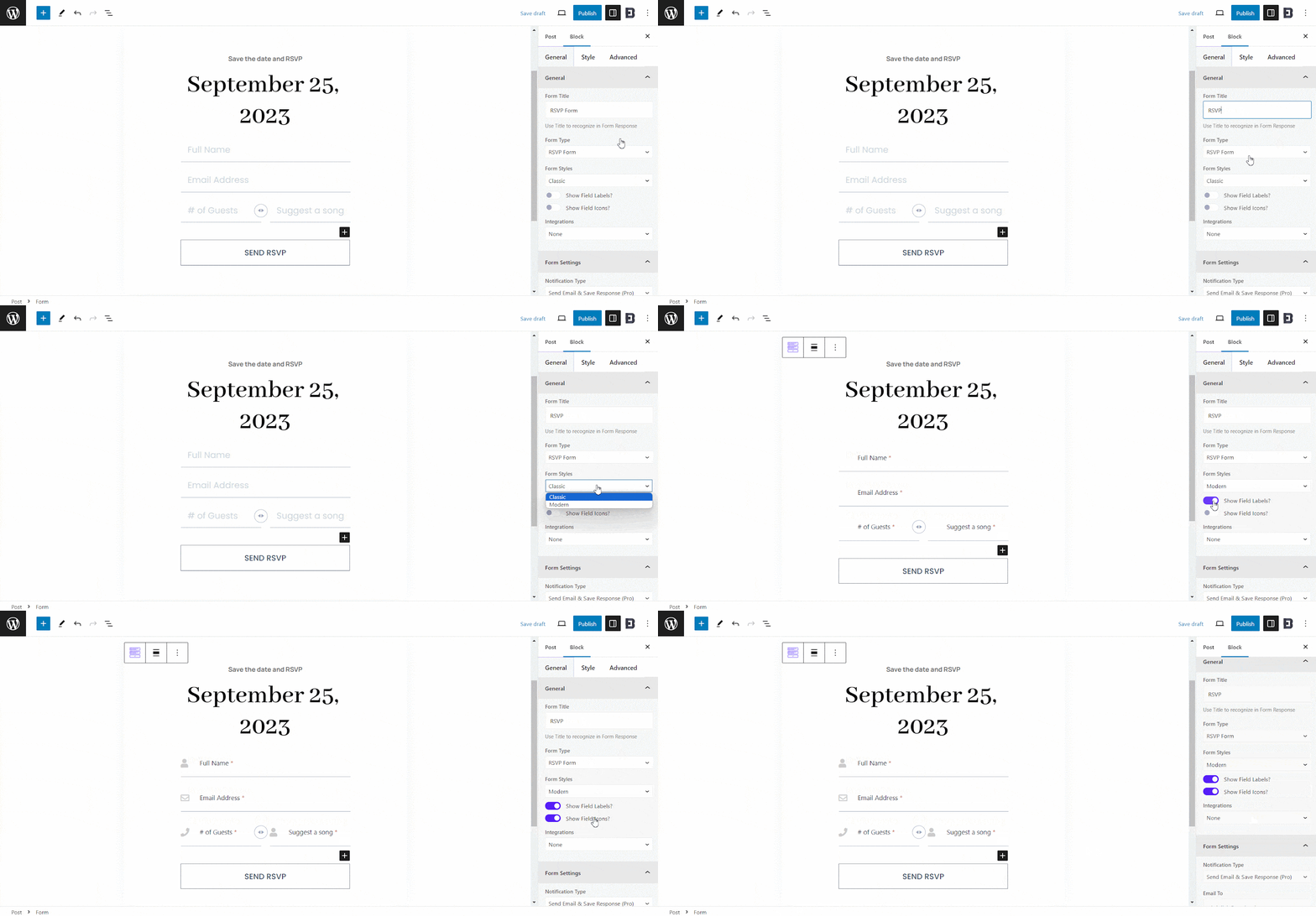
If you are planning an event, this RSVP form makes collecting guest details quick and enjoyable. The ‘Save the Date’ header immediately tells users what to do, while interactive fields such as ‘Suggest a song’ make the form feel fun rather than a chore. It also asks for the number of guests right away, helping you plan logistics more efficiently. With its stylish design and engaging fields, this form turns event planning into a smooth experience for both you and your guests.
Signature Subscription Form
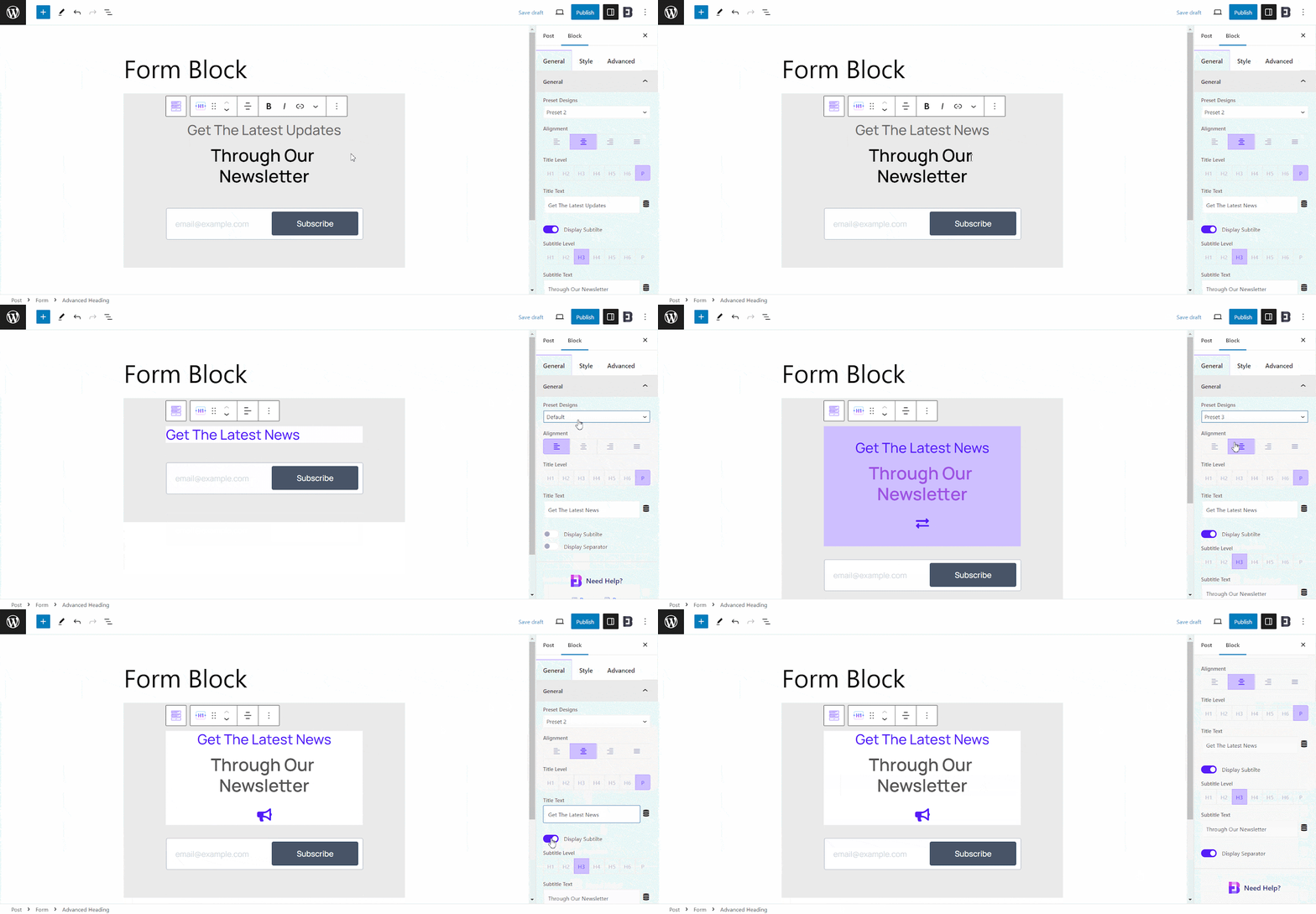
Designed to grow your newsletter list, the signature subscription form uses a bold, eye‑catching layout that stands out in your footer or sidebar. It works in two steps: first, it asks for an email, which makes it easy for users to get started. Then, it asks about their interests so you can send them more relevant content. This approach not only increases sign‑ups but also helps you deliver better, personalized emails that keep subscribers engaged.
With these 3+ templates, you can skip the hard work of building forms from scratch and launch multi‑page designs that look professional, feel easy to use and help you capture more leads, bookings or subscribers.
How to Design Multi-Page Forms with Essential Blocks?
Creating these forms is incredibly straightforward. You do not need to touch any code files. Here is a simple guide on How to design multi-page forms using the Essential Blocks plugin.
Step 1: How To Activate the EB Form Block?
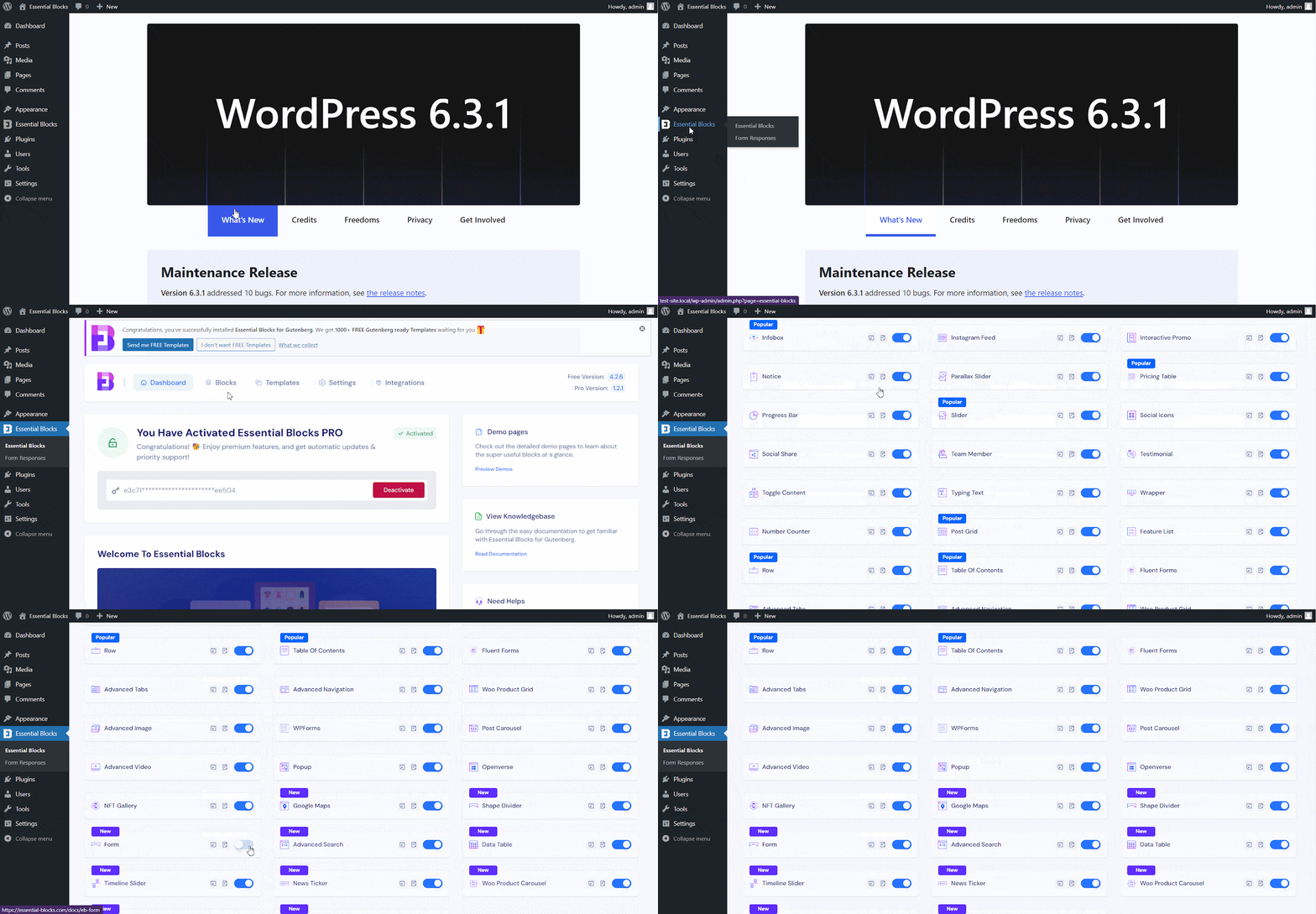
Activate the Form block by navigating through Essential Blocks and then selecting Blocks. Switch it on to enable. Some features are premium, so install and activate Essential Blocks PRO along with the free version to unlock all options.
Step 2: How To Add Essential Blocks Form Block?
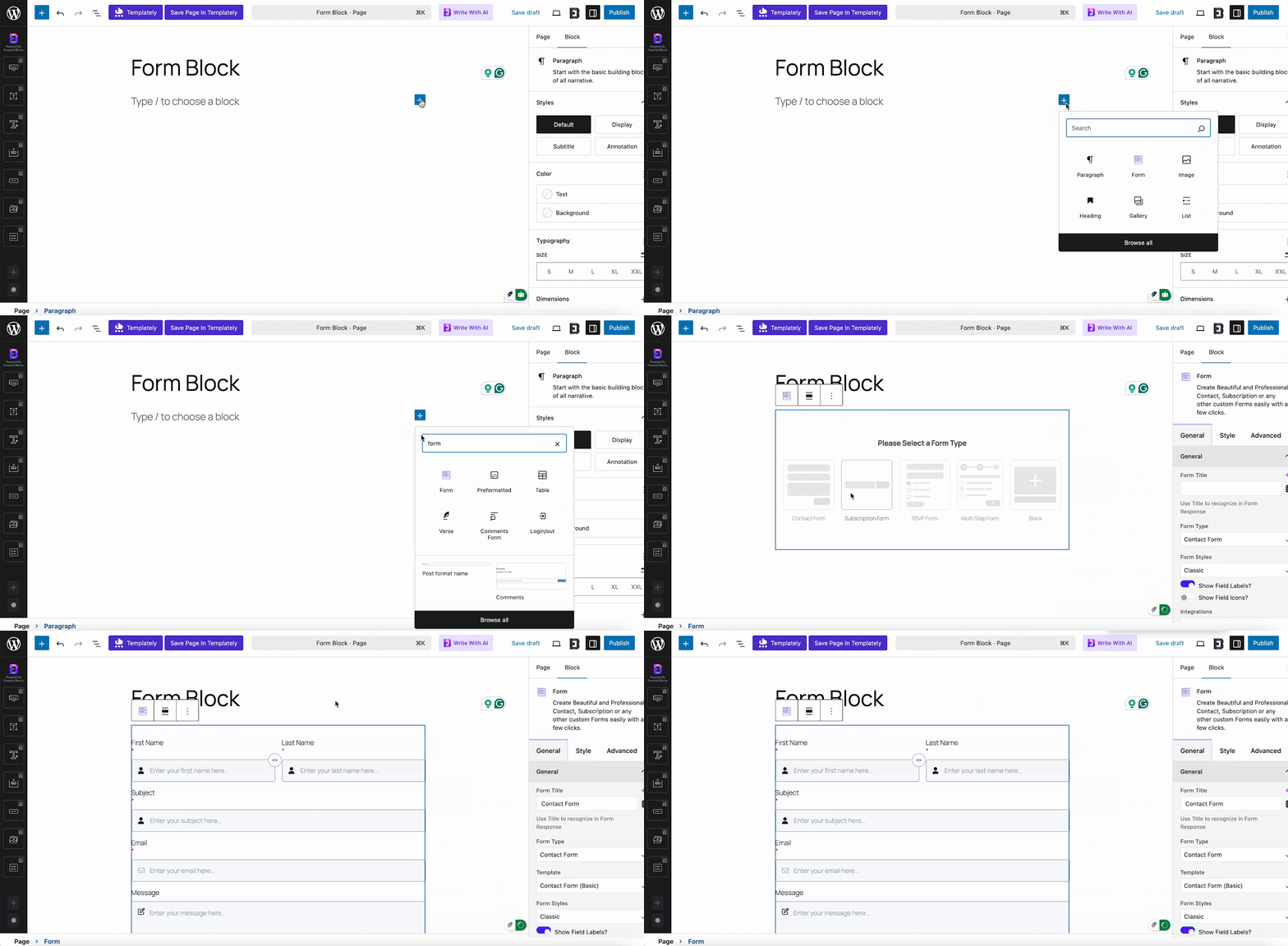
In your WordPress dashboard, open Pages or Posts and create a new one, or edit an existing page. Click the ‘+’ icon, search for Form, then add or drag it to the spot you want.
Multi-Page Form
Add the Essential Blocks Form block onto the page. Then select ‘Multi Step Form’ from the options. This is how the form will appear.
In the Form Styles dropdown, customize how input fields look. Pick Classic or Modern and toggle field labels or icons on or off.
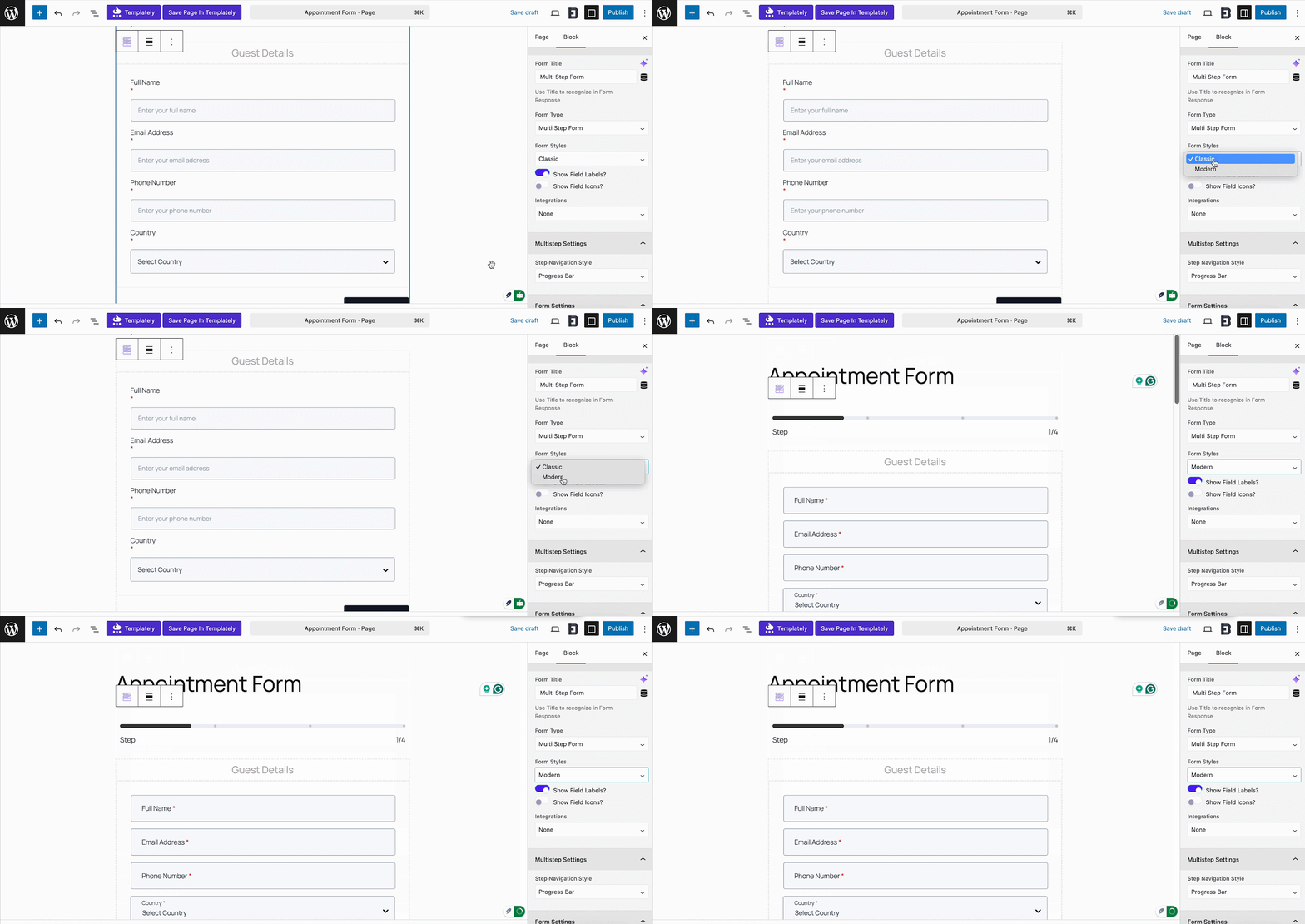
Multi-step Form Progress Bar
In Multistep Settings, choose a Step Navigation Style from seven layouts like Progress Bar, Breadcrumbs or Step Titles.
Inline allows you toggle step numbers, while Step Titles 2, Step Titles 3 and Dot/Circle allow you toggle subtitles.
Select the step container to see settings on the right. From there, update the title, add inner blocks or set conditional logic.
Conditional Logic Gate
Conditional logic redirects customers to different steps based on rules you set. Select a step, open the Conditional Logic tab and enable it. Choose a field, operator, and value to decide when the step shows or hides. Add multiple conditions by repeating the process.
Add/ Delete a Multi-step Form Step
Select the step container and click Delete in Settings. The step is removed instantly and the Submit button moves to the previous step.
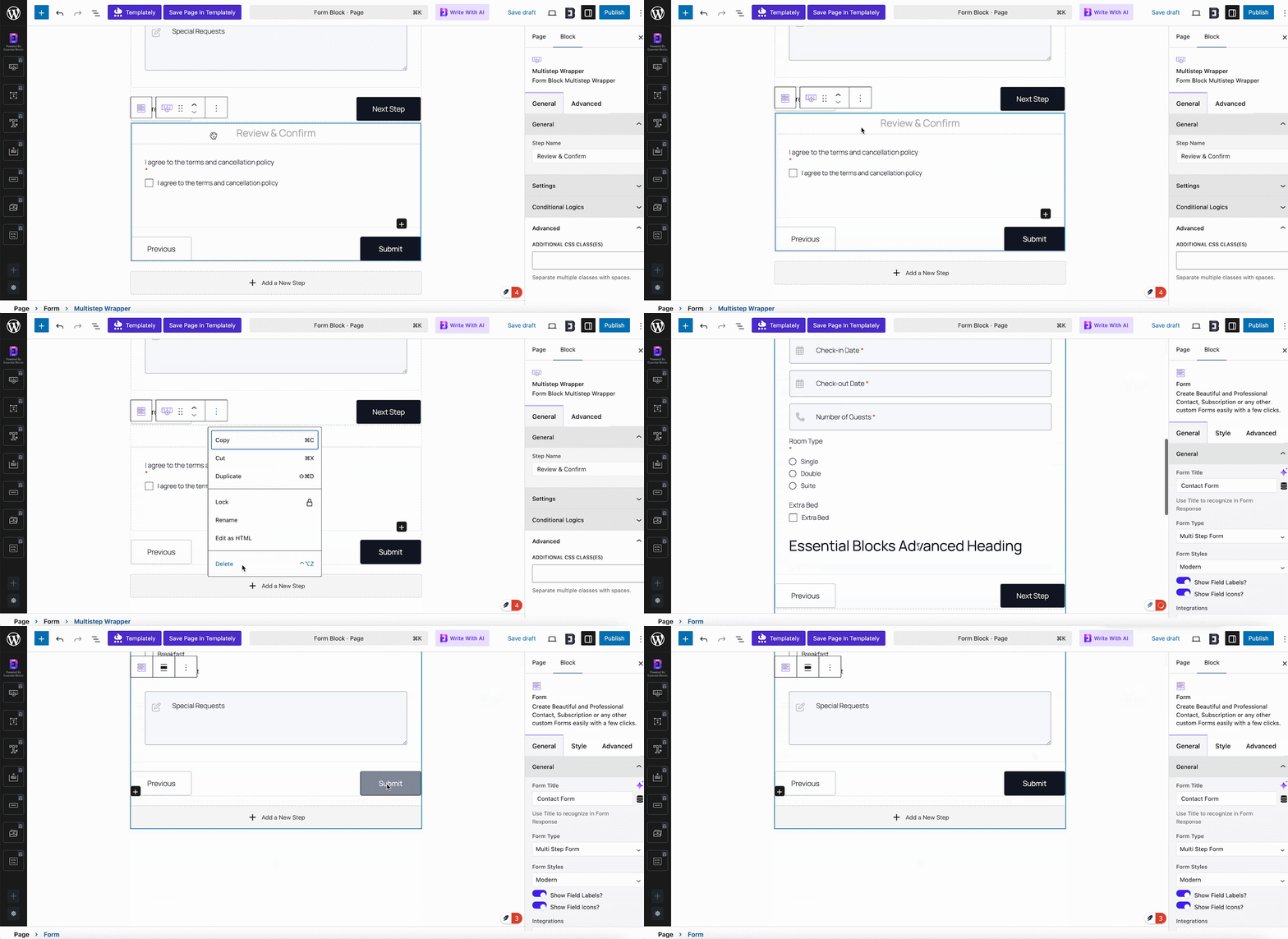
Click Add New Step in your form to create another section. Customize it with inner blocks and design options, and from the second step onward, you can add conditional logic.
You can manage settings like notifications, MailChimp integration, sender details and buttons. From the Style tab, customize colors, fonts, and backgrounds.
Once your form is ready, publish the page or post. With these steps, creating and designing a multi-step form in Gutenberg using Essential Blocks is quick and easy.
Key Features That Make These Forms Powerful
The Form Block of Essential Blocks is packed with features that go beyond just basic text inputs. These technical capabilities ensure your Multi-Page WordPress Forms are professional and functional.
Advanced Conditional Logic
While simple forms are great, sometimes you need more power. Conditional logic allows you to show or hide fields based on user answers. For example, if a user selects “Other” in a dropdown menu, a new text field can appear asking them to specify. This keeps your forms clean and relevant. Users never see questions that do not apply to them. It personalizes the experience in real-time.
Mobile Responsiveness
A form that looks good on a desktop but breaks on an iPhone will hurt your business. These templates are automatically responsive. The fields stack correctly and the buttons are large enough to tap with a thumb. You do not need to write custom CSS media queries to make this happen. The plugin handles all the heavy lifting for different screen sizes.
Spam Protection
Nothing is worse than getting hundreds of spam submissions. Essential Blocks includes integration for reCAPTCHA. This protects your inbox without ruining the experience for real human users. It is a vital technical feature for any public-facing form. It ensures that the leads you generate are genuine and actionable.
Seamless Integration
Your form data needs to go somewhere useful. You can connect these forms to email marketing platforms or save the entries directly to your database. This assists with Lead generation automation. You can have new leads sent straight to your CRM or mailing list instantly. This connectivity saves you hours of manual data entry every week.
Best Practices for Designing High-Converting Forms
Just because you have a great tool does not mean you can ignore design principles. To get the most out of your best WordPress form templates, you should follow some golden rules.
Keep Labels Clear and Short
Avoid using technical jargon in your field labels. Use simple language like ‘First Name’ or ‘Your Email’. Confusing labels increase the time it takes to fill out the form ,which leads to drop-offs. Clarity is the king of conversion.
Use Visual Cues
Make sure your active field is highlighted. When a user clicks on a box, it should change color slightly. This helps them track where they are on the page. It is a small detail that improves the User interface usability significantly. It reduces eye strain and keeps the user focused on the immediate task.
Test Your Forms Regularly
Before you launch your new multi-step form to the public, test it yourself. Try it on your phone and your laptop. Ask a friend to fill it out and watch where they hesitate. This feedback is invaluable for refining your WordPress Form Design. A broken form is a lost opportunity, so testing is non-negotiable.
Start Building High-Converting Multi-Page Forms Today
Multi‑page forms are more than just a design choice; they are a proven way to boost engagement and collect better insights. With Essential Blocks, you do not need coding skills to create forms that look great and convert. Whether it is for education, business or lead generation, the right form can make all the difference. Take the templates, customize them to your brand and publish with confidence. The sooner you start, the sooner you will see results, so build your high‑converting multi‑page form today.
Enjoyed this blog? Subscribe for the latest updates and join our Facebook community to stay connected with new features, tips and announcements.