Think of that one experience on an eCommerce store, when you really wanted to buy something, but the checkout flow was so poorly designed, you just accepted your losses and clicked off the tab.
According to Baymard’s study, the average cart abandonment rate across all industries is 70%. If your online business is on WordPress, you absolutely need a smooth WooCommerce checkout flow; it is analogous to a smiling cashier who asks you about your day and says, “goodbye, visit again.”
A poorly designed and slow-loading WooCommerce checkout flow can feel like torture, and you do not want to force your customers to wait while buttons take forever to redirect. Delays create doubt, and doubt kills conversion. 9 out of 10 shoppers say they will abandon cart if a site “takes too long to load,” directly linking delay to lost revenue.
The initial intent to buy turns into frustration and your revenue suffers slowly, quietly. Frustrated customers, who walked away once, rarely return. So, your WooCommerce checkout page matters just as much as the products in your catalogue.
Quick Summary: Before We Begin
Before we learn all about the WooCommerce checkout flow optimization, let us quickly overview everything that is covered in this blog.
| Area | Common Problems | WooCommerce Relevance |
|---|---|---|
| Common Checkout Problems | Slow pages, forced logins, endless fields, hidden costs and limited payments frustrate users and drive abandonment. | Shows why editing WooCommerce checkout pages and improving WooCommerce checkout flow is critical. |
| Free vs. Pro | Free core handles basic products, checkout, payments, shipping and orders; Pro-level stack adds subscriptions, advanced checkout, funnels, shipping rules and marketing automation. | Guides whether free WooCommerce is sufficient or whether a checkout plugin for WooCommerce is needed for optimized WooCommerce checkout pages. |
| Core Checkout Essentials | Billing/shipping fields, payment details, progress indicators, trust signals, guest checkout and optional upsells. | Forms the foundation for an intuitive WooCommerce checkout experience. |
| Customization Options | Native settings, field editors, visual builders, one-page layouts and conditional fields. | Enables merchants to change the WooCommerce checkout page without breaking the flow. |
| Continuous Optimization | A/B testing, autofill, mobile responsiveness, speed, trust and support monitoring. | Ensures WooCommerce checkout flow evolves with customer behavior and maximizes conversions. |
Why Is WooCommerce Checkout Flow Optimization Important?
WooCommerce checkout flow optimization is crucial because it directly combats the industry’s 70% average cart abandonment rate, turning potential lost sales into completed purchases. Every extra click, unnecessary field, or slow-loading page adds to this number and optimizing helps with purchase completion, overcoming hanging carts.
Revenue Impact
Poor checkouts cost WooCommerce merchants dearly. A 1-second delay drops conversions 7%, whereas optimized WooCommerce checkout flows elevate conversions. So much so, stores enjoy up to 30% increases in conversion from guest checkout and speed tweaks alone.
User Experience Gains
Fatigue from long forms, forced logins (19% abandonment trigger), or mobile issues hinders conversions. Optimization creates intuitive paths with fewer fields, progress bars and trust signals, which respect shopper time, especially on mobile.
Business Benefits
Fast, simple checkouts drive higher completions. Optimized WooCommerce checkout flows build trust and retention through clear policies and cached autofill, encouraging repeat purchases. Small, no-code tweaks like trimming unnecessary fields often boost conversions 10–20% immediately. Without an optimized checkout, even the best products can fail at the final hurdle. Checkout is your store’s true closer.
How We Evaluated WooCommerce Checkout Flows
Here is a framework to give clear, actionable advice for improving WooCommerce checkout pages. We base our table on insights from the Baymard Institute, Google UX guidelines and real-world A/B test stats from WooCommerce stores. Each point is weighted by its impact on conversions:
- High for major revenue drivers
- Medium for strong boosters
- Low for helpful but less critical tweaks.
| Criterion | Why It Matters | Weight |
|---|---|---|
| Checkout Step Clarity | Confusing steps cause 30% abandonment. Clear labelling guides users intuitively. | High |
| Progress Indicator Visibility | Users need to know “how close to done?” as it reduces perceived effort. | High |
| Form Length & Field | Fewer fields mean faster completion; excess fields double abandonment risk. | High |
| Mobile Checkout | 53% of eCommerce traffic comes from mobile. Poor UX means losing half your buyers instantly. | High |
| Page Speed & Loading Time | Every 1-second delay cuts conversions 7%; aim for a <2s load time. | High |
| Payment Methods | Limited options frustrate users, while variety makes room for more buyers. | Medium |
| Trust Signals | Badges/logos, social proof reduce hesitation by 40%, while building confidence during payment. | Medium |
| Distraction-free Checkout Design | Upsells/modals interrupt flow, while a clean design is straightforward, guiding to completion. However, some stores like POD need upsells or modals. | Low |
What Are the Common Problems with WooCommerce Checkout & Their Solutions?
What actually creates the need for editing WooCommerce checkout pages and optimizing checkout flows? These might include forced signups, endless fields, repeated typing, non-responsive layouts, limited payment options and surprise costs, resulting again in abandoned carts, lost sales and missed opportunities for retention and repeat purchases.
Below, after a thorough look at the WooCommerce landscape, we have listed the most common WooCommerce checkout flow issues and their respective solutions.
| Problem | Scenario | Possible Reason | Solution |
|---|---|---|---|
| Slow Loading Page | A customer reaches checkout, ready to buy. The page takes 5 seconds to load. Then, another 3 for payment selection, and a spinner after clicking ‘Place Order.’ | Bloated scripts and unreliable third-party widgets slow the page. Often, the choice of hosting also affects speed. | Optimize page speed. Minimize scripts, enable caching, use a fast CDN, compress images and use reliable servers to host your website. |
| No Guest Checkout or Sign-Up Option on Checkout | A shopper adds items to the cart and is stopped by a login wall. No guest option and no sign-up button on checkout. | Checkout prioritizes data capture over purchase. Momentum breaks and retention is lost. | Include a guest checkout toggle. Place a visible sign-up/login button on checkout for returning users. |
| Excessive Fields, No Caching, Repetitive Input | The checkout form is long. Company name, second address line, fax, multiple dropdowns. No autofill; returning customers must retype details. | Too many irrelevant fields frustrate users. No caching punishes repeat visitors. | Remove unnecessary fields, enable autofill, cache customer details and provide real-time validation. |
| Missing Trust Signals at Payment | The checkout page looks generic. No SSL, payment logos, or private payment gateways. Payment feels disconnected from the brand. | Sensitive data is submitted without reassurance. No retention prompts | Add SSL certification, recognizable payment logos, privacy links, and prompt account connection for returning users. |
| Multi-Page Checkout With No Progress Indicator | Checkout spans multiple pages. No progress bar, and customer details are not saved between pages. | Limitations in theme design, Custom CSS and JavaScript conflicts. | Use one-page checkout, but if you need multiple steps, use progress indicators. Cache entered data. |
| Non-Responsive Checkout | On mobile, fields are tiny, buttons are hard to tap, the keyboard hides inputs, and “Place Order” scrolls out of view. Returning users must type again. | Desktop-first design ignores mobile ergonomics, touch targets, autofill and caching. | Design mobile-friendly: large touch targets, responsive layout, sticky submit buttons and cache customer details. |
| Limited Payment Options and Friction | At checkout, only one payment method is available. No one-click solution, no saved payment prompt. | Payment is treated as a backend afterthought. Convenience for repeat purchases is lost. | Offer multiple payment options, one-click or saved-card options and prompt users to save details for future checkout. |
| Unexpected Costs at Final Step | Shipping, taxes, or discounts appear only at the last moment. Returning users must re-enter address info to see totals. | Surprise costs erode trust. Lack of caching increases frustration. | Show all costs upfront, cache customer info, offer account creation and highlight discounts/loyalty rewards early. |
Difference Between Ideal And Poor WooCommerce Checkout Flow from the User’s End
Checkout is the final decision point, where every extra step matters. A well-designed flow respects the customer’s time and attention, guiding them smoothly from cart to confirmation with minimal resistance.
What an Ideal Checkout Flow Looks Like
High-performing checkouts favour fewer steps, logical progression and a responsive, mobile-friendly design. The journey should feel natural: reviewing the cart, entering contact and delivery details, selecting payment and receiving confirmation. Nothing more, nothing less.
What a Poor Checkout Flow Looks Like
On the other hand, however, a checkout that forces account creation, separates essential steps across multiple pages, lacks visual progress and offers little reassurance quickly drives customers away. Slow load times and missing trust signals only accelerate abandonment.
How to Optimize the WooCommerce Checkout Flow?
An effective WooCommerce checkout page keeps everything in view. Customers can review their order, apply discounts, enter details with autofill and pay in one place. Features like saved payment methods and sticky action buttons reduce effort and increase confidence, often delivering measurable lifts in conversion. Below is a list of everything your WooCommerce checkout page should have.
Native WooCommerce Configuration
The built-in settings define how your WooCommerce checkout page operates, including payments, shipping, currency and customer accounts. Correct configuration sets the foundation for a stable and reliable checkout experience, so during the setup phase, take your sweet time and make sure everything is configured correctly.
Core Form Fields
A strong WooCommerce checkout page begins with essential form fields, including billing and shipping details, payment options and a clear order summary. Each field should be intuitive and purposeful, allowing customers to complete their purchase without confusion or hesitation. Extra or unclear inputs increase the likelihood of cart abandonment, making careful design essential for any WooCommerce checkout.
Customizing Checkout Fields
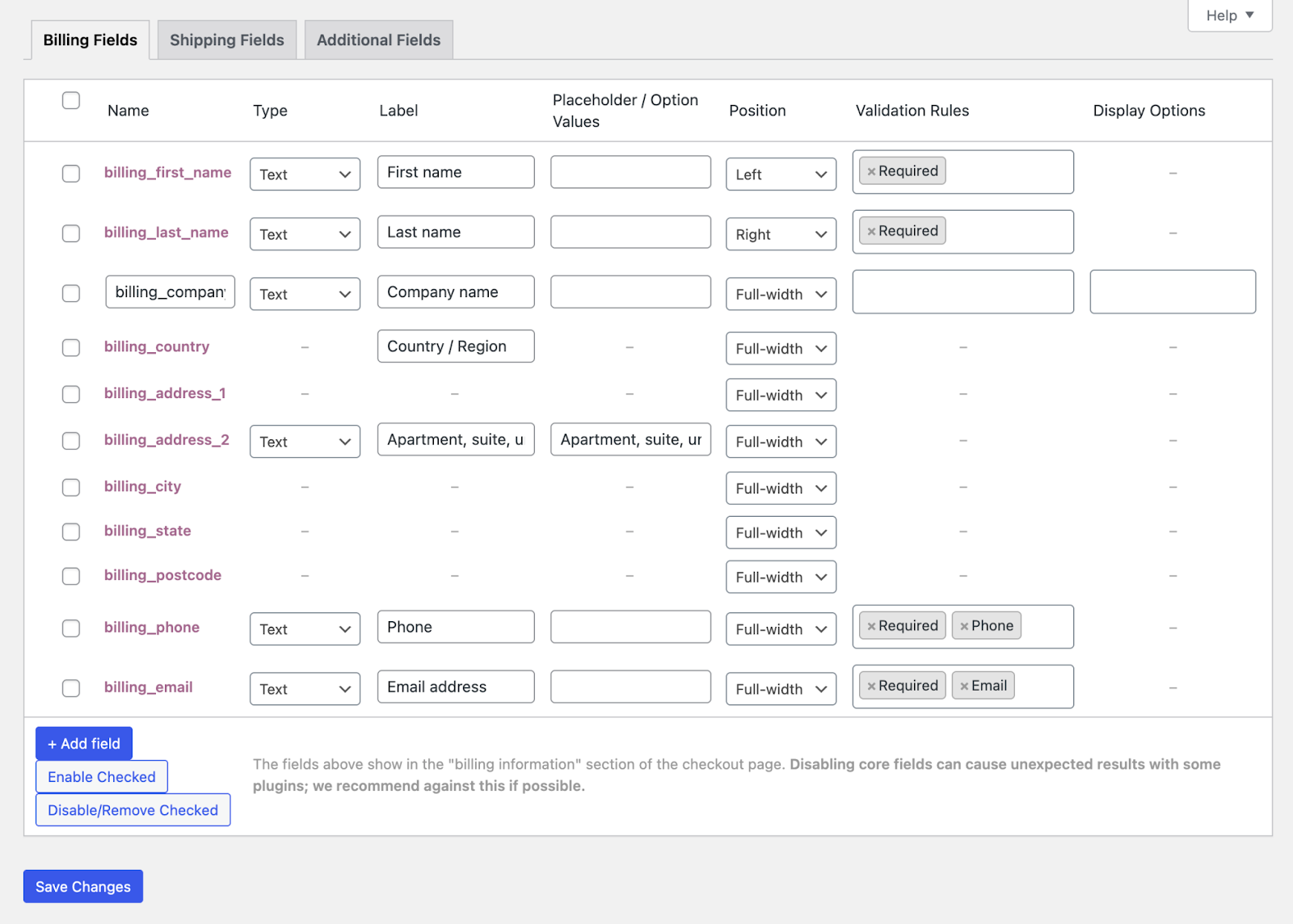
Plugins and extensions like Checkout Field Editor allow you to change your WooCommerce checkout page by adding, removing or rearranging fields. For advanced needs, custom code provides deeper control, ensuring the checkout collects only what is necessary while remaining user-friendly. Keep in mind that the fewer fields you have, the better. A form with a maximum of 15 fields results in a 109% boost in conversions.
Navigation And Flow Enhancers
Customers should always understand where they are in the process and what comes next. Clear WooCommerce checkout flow elements like progress indicators, guest checkout options, and prominent Place Order buttons guide users efficiently through the checkout. Proper flow prevents frustration and keeps the momentum going.
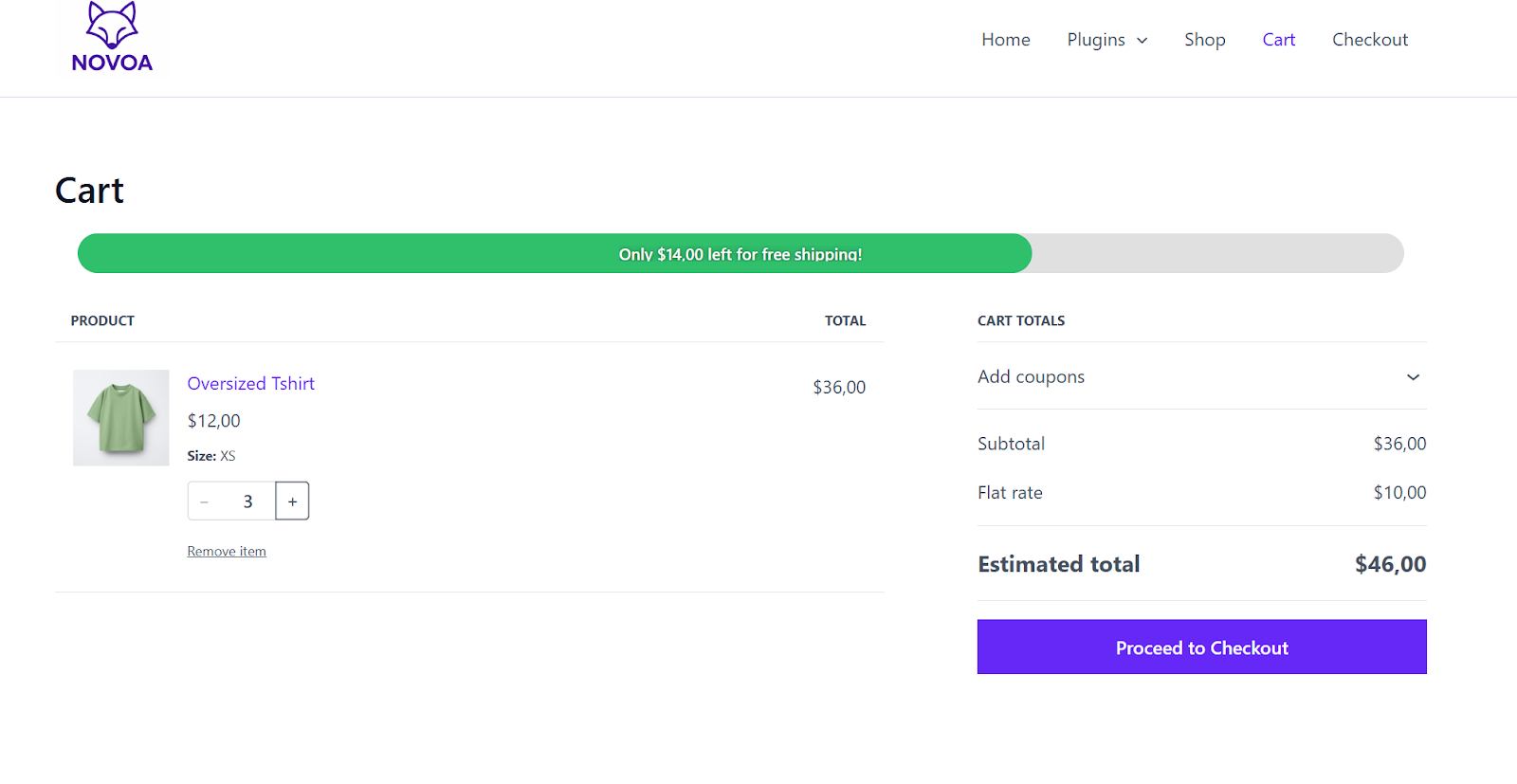
Trust And Reassurance
Entering personal and payment information is the moment of highest anxiety for shoppers. Displaying security badges, payment logos, privacy links and terms acknowledgements reassures users that their data is safe. Thoughtful placement of trust signals on a WooCommerce checkout page increases confidence, reduces hesitation and encourages completion. One way of reassuring customers into purchase completion is by displaying sales alerts and social proof.
Optional Enhancements
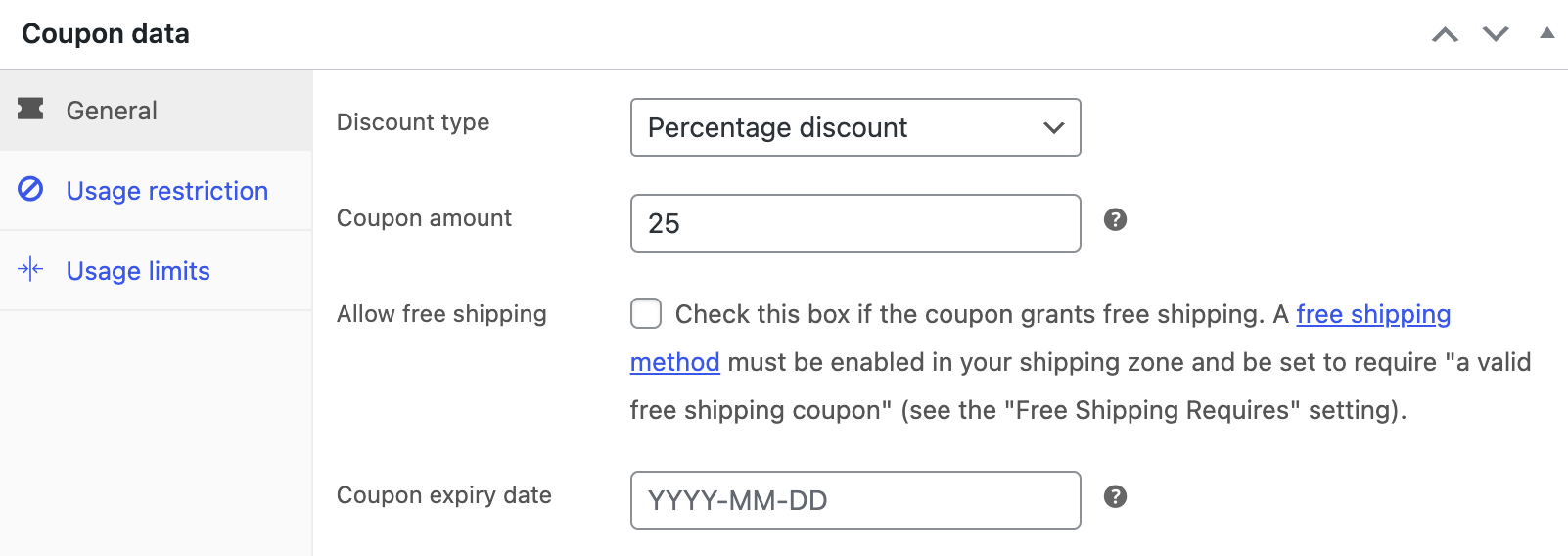
Optional elements such as order notes, discount fields, subtle upsells and login prompts can add value when used sparingly. These features should never distract from the primary goal of purchase completion, but can improve conversions and encourage account creation for repeat business, especially when added via a checkout plugin for WooCommerce.
Performance And Accessibility
A fast, responsive and accessible WooCommerce checkout is non-negotiable. Nearly 74% shoppers will abandon their cart if load times exceed 3s, and the numbers are even higher for mobile checkout.
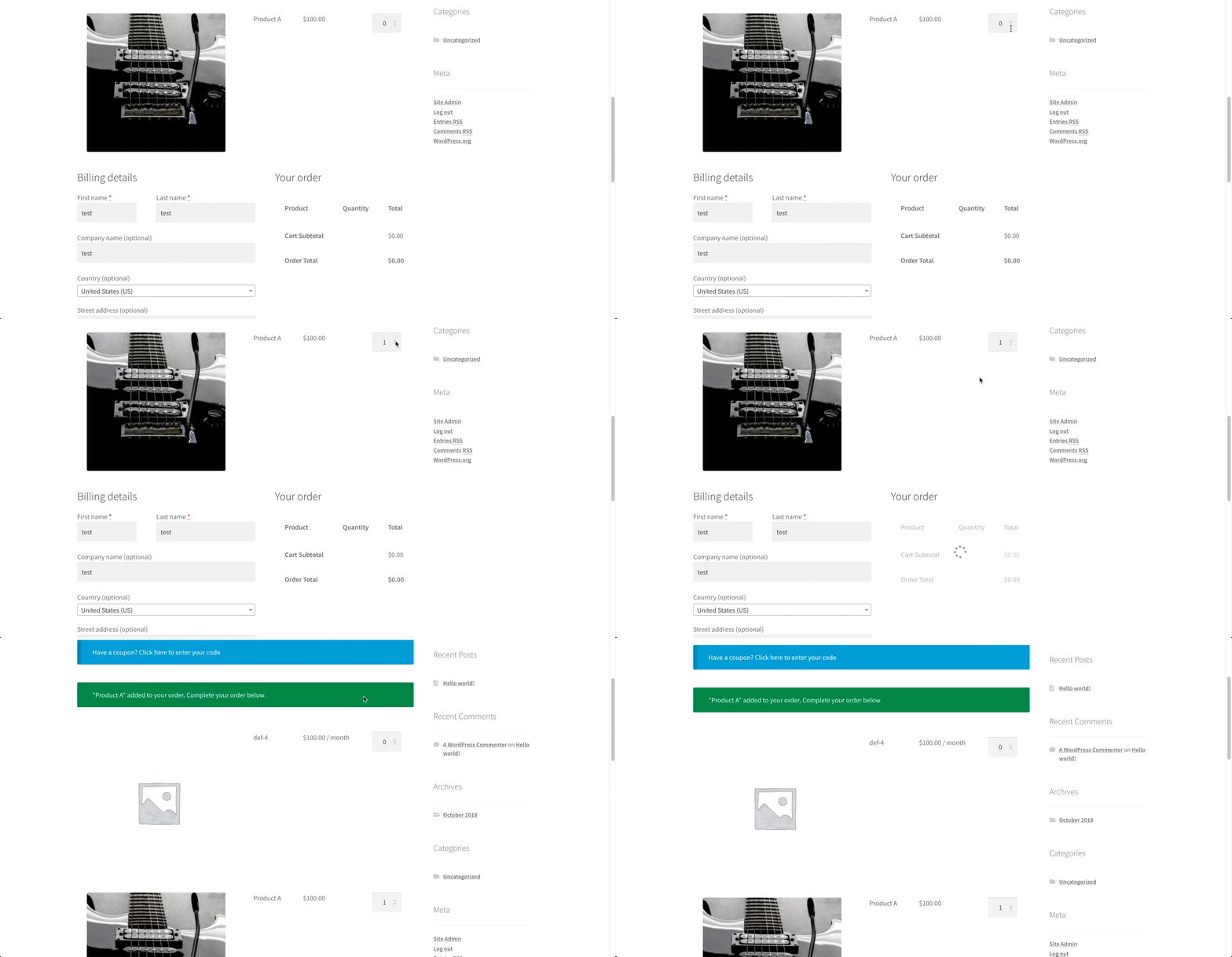
Mobile-friendly design, real-time validation and one-page checkouts make it simple for every customer on every device to complete their purchase. Neglecting speed or mobile ergonomics risks lost sales and frustrated repeat visitors. While site speed is often related to your server and hosting, you can avoid cart abandonment with Woo’s One Page Checkout.
One-Page Checkout Experiences
Though not suitable for every type of product, condensing the checkout into a single page shortens decision-making time and reduces hesitation. For example, when selling bundled products, say, a “Starter Kit” containing a laptop, accessories and an extended warranty.
Here, customers need to see all selections, prices and optional add-ons at once. A one-page WooCommerce checkout flow lets them review the bundle, select extras, apply discounts and complete payment without navigating multiple pages, reducing friction and increasing the likelihood of immediate purchase. This layout is particularly effective for high-intent buyers, product-led campaigns and promotional events.
Support And Insight
A WooCommerce checkout page is never truly finished. Ongoing testing, simplification and refinement ensure the experience evolves with customer behavior. Guest checkout, autofill, A/B tests and layout experiments reveal what drives the highest completion rates.
Think of everything after checkout as a conversation with your customer. Continuous monitoring via analytics uncovers where 20-40% of shoppers hesitate (e.g., payment pages), letting you intervene pre-abandonment. Live chat resolves issues instantly, recovering carts, while clear policies and recovery emails hit 41% open rates for 10% conversions.
With this insight, you can reduce abandonment rates by implementing on-page live chat and email reminders. By carefully optimizing your WooCommerce checkout page, you create an experience where speed, clarity and reassurance guide customers smoothly from cart to confirmation.
Difficulty Comparison of WooCommerce Checkout Flow Optimization Strategies
We have summarized the strategies into a single, easy-to-read table that gives WooCommerce merchants a clear roadmap when editing WooCommerce checkout pages. It ranks actions by how much they improve results and how easy they are to implement, showing which steps give the biggest impact with the least effort. Each strategy is organized by effect, difficulty and order, making it simple to follow a step-by-step plan to boost conversions.
| Strategy | Priority | Difficulty | Description |
|---|---|---|---|
| Native WooCommerce Configuration | High | Easy | Set up payments, shipping, currency and accounts correctly. Foundation for a stable checkout. |
| Core Form Fields | High | Easy | Include essential billing/shipping/payment fields with a clear order summary. Keep forms concise to reduce abandonment. |
| Customising Checkout Fields | High | Medium | Use plugins or custom code to add/remove/reorder fields. Aim for 15 fields or less for higher conversions. |
| Navigation and Flow Enhancers | High | Medium | Add progress indicators, guest checkout and clear Place Order buttons. Guides users efficiently through checkout. |
| Trust and Reassurance | Medium | Easy | Display security badges, payment logos, privacy links, sales alerts and social proof to build confidence. |
| Optional Enhancements | Low | Easy | Add order notes, coupon fields, upsells and login prompts sparingly to boost conversions without distraction. |
| Performance and Accessibility | High | Medium | Ensure fast load times (<3s), mobile-friendly design and one-page checkout |
| One-Page Checkout Experiences | Medium | Medium | Condense checkout into one page to reduce friction for bundled/high-intent purchases. |
| Support And Insight | Medium | Medium | Use analytics, A/B tests, live chat and recovery emails to continuously optimize checkout and recover abandoned carts. |
Frequently Asked Question
1) What is WooCommerce checkout flow optimization?
WooCommerce checkout flow optimization is the process of reducing friction during checkout—by improving speed, removing unnecessary fields, enabling guest checkout, adding trust signals, and making the checkout easier on mobile—so more shoppers complete their purchases instead of abandoning their cart.
2) Why do customers abandon carts during WooCommerce checkout?
Customers abandon carts when checkout feels slow, complicated, or untrustworthy. Common triggers include forced account creation, too many form fields, unexpected costs shown late (shipping/taxes), limited payment options, and poor mobile usability.
3) What are the biggest WooCommerce checkout problems to fix first?
Start with the highest-impact issues: improve checkout page speed, enable guest checkout, reduce unnecessary fields, make the checkout mobile-friendly, and add trust signals near payment (secure checkout messaging, recognizable payment logos, privacy/terms links).
4) Should I enable guest checkout in WooCommerce?
Yes, guest checkout usually increases conversions because it removes a major friction point (account creation). If you still want account growth, you can offer optional account creation after purchase or provide a subtle login prompt for returning users without blocking checkout.
5) How do I reduce the number of checkout fields in WooCommerce?
To reduce checkout fields, remove non-essential inputs (like company name, address line 2, fax, etc.), reorder the remaining fields in a logical sequence, and use autofill/real-time validation to prevent errors. Many stores do this using a checkout field editor plugin or custom code.
6) Is one-page checkout better than multi-step checkout in WooCommerce?
One-page checkout can be better when it shortens the path to purchase and keeps everything visible (order summary, discounts, details, payment). Multi-step can work too, but it should include a clear progress indicator and must preserve entered data to avoid retyping.
7) How can I make my WooCommerce checkout faster?
To speed up WooCommerce checkout, minimize unnecessary scripts and third-party widgets, enable caching, use a CDN, compress images, and choose reliable hosting built for WooCommerce, such as xCloud. Checkout speed is critical because even small delays can reduce conversions.
8) What trust signals should I add to a WooCommerce checkout page?
Add trust signals where shoppers feel the most anxiety—near payment. Examples include SSL/security indicators, recognizable payment method logos, privacy policy and refund/return links, and clear terms acknowledgements. Social proof (like sales alerts) can also help reduce hesitation.
9) What payment options should a WooCommerce store offer to reduce checkout friction?
Offer multiple payment options so buyers can choose what they prefer (for example, cards plus express/alternative methods). Limited payment choices can stop a purchase even when intent is high, especially on mobile. Also consider saved payment or one-click options where appropriate for repeat buyers.
10) How do I continuously improve WooCommerce checkout conversions over time?
Checkout optimization is an ongoing process. Use analytics to find drop-off points, run A/B tests on layout and fields, monitor mobile usability and add support options like live chat for shoppers who hesitate at payment. Combine this with cart recovery tactics (like reminder emails) to recover lost revenue.
Optimize the Flow of Your WooCommerce Checkout Pages For Return Buyers
Want your customers to keep coming back for more? Optimize your WooCommerce checkout flow so their experience is seamless from cart to confirmation. Leave no room for complaints by keeping pages fast, forms simple, progress visible, trust signals clear, payment options flexible and mobile interactions fully responsive. Basically, design the checkout you would want as a buyer.
Curious for more? Be sure to read our blogs for expert insights and join our Facebook community for WordPress enthusiasts just like you.